

This Amazon FBA cost calculator helps beginners estimate startup costs, launch budget, and common budget risks before buying inventory.
Starting Amazon FBA is not only about buying inventory. Before you place your first order, you need to estimate the full launch budget, including samples, shipping, Amazon account costs, product photos, PPC, tools, and a safety buffer.
Before estimating your launch budget, you should also confirm whether you can register as an Amazon seller from your country. If you are not sure, check our Amazon seller eligibility checker first, then come back to estimate your startup costs.
This Amazon FBA startup cost calculator helps beginners estimate how much money they may need before launching. It also shows where the budget goes and flags common risks, such as spending too much on inventory, forgetting PPC, or leaving no emergency buffer.
The goal is not to give a perfect number. The goal is to help you think through the main cost layers before you buy inventory or commit to a supplier.
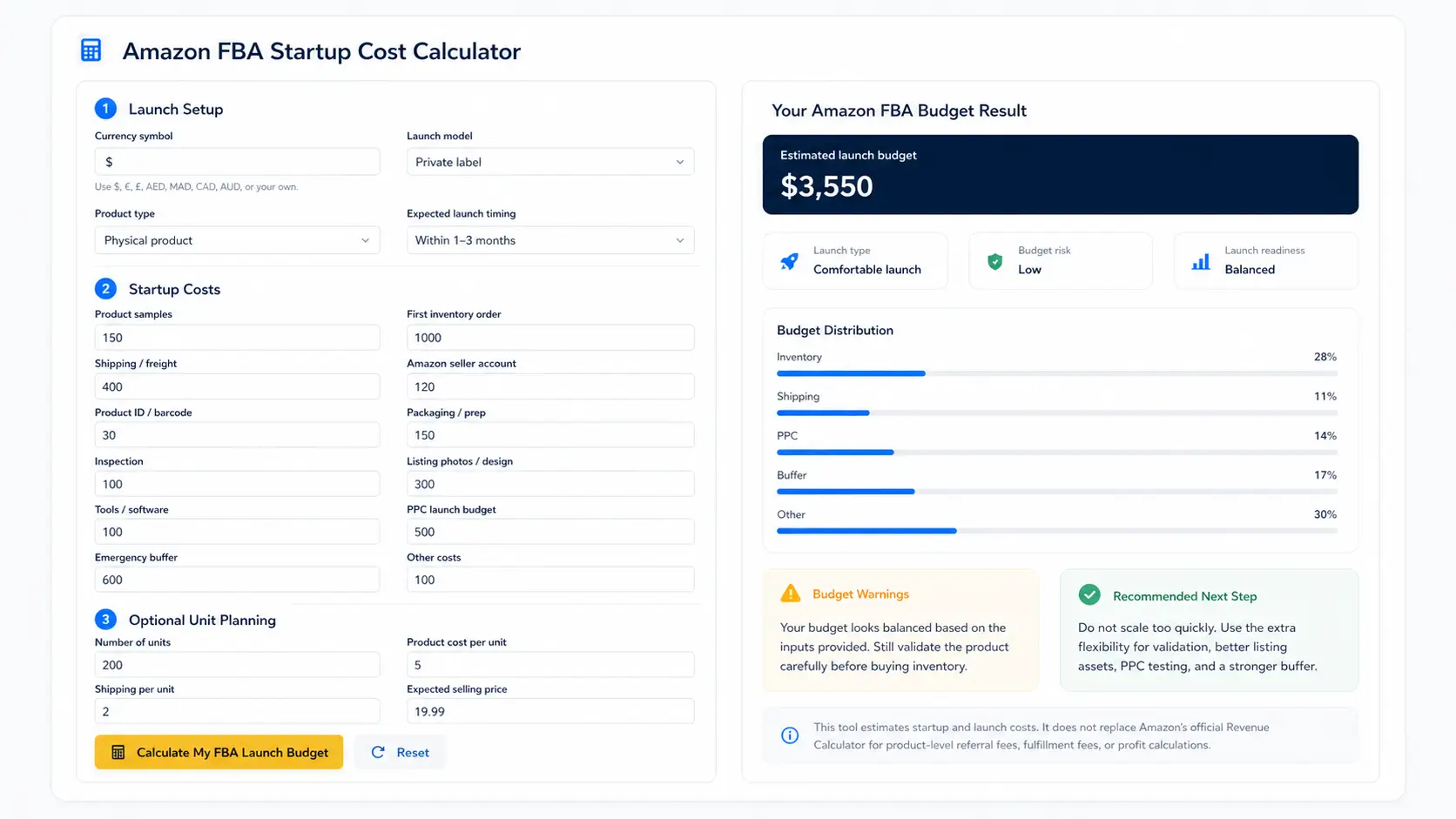
Amazon FBA Startup Cost Calculator
Estimate your launch budget, understand where your money goes, and spot beginner budget risks before buying inventory.
Choose Your Launch Setup
Enter Startup Costs
Unit Planning
Your Amazon FBA Budget Result
Enter your numbers, then click calculate to generate your launch budget report.
Fill in the calculator to see your main budget issue.
Budget Distribution
Optional Unit Estimate
Enter unit details to estimate the upfront launch budget per unit.
Budget Warnings
- Your warnings will appear here after calculation.
Recommended Next Step
Add your estimated costs and calculate your budget.
This tool estimates startup and launch costs. It does not replace Amazon’s official Revenue Calculator for product-level referral fees, fulfillment fees, storage fees, or profit calculations.
What This Amazon FBA Cost Calculator Includes
This calculator focuses on the startup and launch costs beginners often need to plan before selling through Amazon FBA.
It can help you estimate costs such as product samples, first inventory order, shipping or freight, Amazon seller account costs, product IDs or barcodes, packaging, inspection, listing photos, tools, PPC launch budget, and emergency buffer.
It also looks at how your budget is distributed. For example, if most of your money is tied up in inventory and very little is left for PPC or unexpected costs, the calculator will flag that as a potential risk.
How to Use the Amazon FBA Startup Cost Calculator
Start by choosing your currency symbol, launch model, product type, and expected launch timing. These settings help the calculator give more useful warnings.
Next, enter your estimated startup costs. If you are not sure about a cost, use a realistic estimate rather than leaving it out completely. Beginners often underestimate shipping, PPC, packaging, and emergency buffer costs.
The optional unit planning section lets you enter your first order quantity, estimated product cost per unit, estimated shipping per unit, and expected selling price. This does not replace Amazon’s official Revenue Calculator, but it can help you understand the upfront pressure of your first order.
How Much Does It Cost to Start Amazon FBA?
There is no single fixed amount that applies to every Amazon FBA beginner. A realistic startup budget depends on the product, supplier, order quantity, shipping method, product size, listing quality, PPC plan, and how much buffer you keep for mistakes or delays.
Some people can start learning or testing with a small budget, but a serious private-label Amazon FBA launch usually needs more than just the Amazon seller account fee. Inventory, shipping, samples, listing assets, PPC, and emergency buffer can quickly become the biggest parts of the launch budget.
Business formation costs are separate from your product launch budget. If you are wondering whether to form a company before starting, read our guide on whether you need an LLC to sell on Amazon before adding legal setup costs to your budget.
For many beginners, the safest approach is not to spend the least possible amount. It is to start with a controlled budget, choose a simple product, avoid over-ordering, and make sure the numbers still work after Amazon fees, shipping, ads, and unexpected costs.
Amazon FBA Startup Cost Benchmarks for Beginners
While every product is different, beginners can use rough budget ranges to understand what type of Amazon FBA launch they are planning. These are not guarantees, but they can help you compare your budget against common beginner scenarios before buying inventory.
| Budget range | Launch type | What it usually means |
|---|---|---|
| $100–$500 | Learning-only budget | Useful for research, samples, tools, and learning, but usually too limited for a serious private-label launch. |
| $500–$2,000 | Lean test launch | A small test budget that may work for simple products, resale tests, or very controlled first orders. |
| $2,500–$5,000 | Beginner private-label launch | A more realistic range for many beginners because it leaves room for inventory, shipping, photos, PPC, tools, and buffer. |
| $5,000+ | Higher-risk or larger launch | May allow more inventory or stronger marketing, but it can also increase risk if the product has not been tested carefully. |
The most important point is not only the total amount. A safer beginner budget should not put nearly all available cash into inventory. It should also leave room for shipping, product photos, PPC testing, tools, inspection, and an emergency buffer.
If your budget is small, the safer move is usually to reduce the first order size, choose a simpler product, or keep the launch in a learning or testing phase instead of forcing a full private-label launch too early.
What Makes This Different From an Amazon FBA Fees Calculator?
Most Amazon FBA calculators estimate product-level profit after you already know your product, ASIN, selling price, dimensions, weight, and category. Those tools are useful when you are comparing a specific product or estimating referral fees, fulfillment fees, storage fees, and profit margin.
After you have a specific product, ASIN, dimensions, weight, and selling price, you can also compare product-level fees using Amazon’s official FBA Revenue Calculator.
This calculator focuses on an earlier beginner question: how much money might you need to launch, how is your startup budget distributed, and where could budget risks appear before you buy inventory?
In simple terms, an Amazon FBA fees calculator helps you analyze a product. This Amazon FBA startup cost calculator helps you analyze your launch budget.
Common Amazon FBA Startup Costs Beginners Forget
Many beginners focus on inventory cost and forget the costs that appear around the launch. These smaller costs can make the budget tighter than expected.
Common forgotten costs include product samples, supplier shipping, packaging changes, inspection, listing photos, PPC testing, storage, returns, damaged units, software tools, and cash flow gaps before sales become steady.
A beginner who spends almost the entire budget on inventory may not have enough money left to fix problems, test ads, improve the listing, or reorder if the product starts selling. That is why the calculator pays attention to budget balance, not just the total number.
What Your Launch Budget Result Means
The calculator groups your result into a launch budget type. This is not a guarantee of success or failure. It is a practical way to understand whether your budget looks more like a learning-only budget, a lean test, a controlled beginner launch, or a higher-risk launch.
A balanced beginner budget usually leaves room for more than inventory. It should also protect money for shipping, PPC, listing assets, samples, and unexpected problems.
If the calculator shows a high-risk result, that does not mean you cannot start. It means you may need to rebalance the budget before buying inventory. Reducing the first order size, increasing the buffer, or including missing costs can make the launch less fragile.
After estimating your launch budget, the next step is deciding whether the business model fits your situation. Read our full guide on whether Amazon FBA is worth it in 2026 before committing to inventory.
Next Step: Read the Full Amazon FBA Startup Cost Guide
This calculator gives you a practical estimate, but you should also understand the full cost structure before launching.
For a deeper breakdown of beginner budgets, startup cost examples, forgotten costs, and launch planning, read our full guide on how much it costs to start Amazon FBA.
Frequently Asked Questions
Here are some of the most common questions beginners ask about Amazon FBA startup costs, budgets, fees, inventory, and launch planning.
The cost depends on your product, inventory size, supplier, shipping method, listing assets, PPC budget, and safety buffer. Some beginners can start learning with a small budget, but a serious inventory-based launch usually needs more room for inventory, shipping, ads, and unexpected costs.
An Amazon FBA cost calculator helps you estimate the money needed to start or launch an Amazon FBA business. This calculator focuses on startup costs such as samples, inventory, shipping, tools, product photos, PPC, and emergency buffer.
No. An Amazon FBA fees calculator usually estimates product-level fees such as referral fees, fulfillment fees, storage fees, and profit margin. This Amazon FBA cost calculator focuses on the broader startup budget before launch.
Yes. This calculator does not require an ASIN because it is designed for early budget planning. If you already have a specific product or ASIN, you can later use Amazon’s official Revenue Calculator to estimate product-level FBA fees.
You should include product samples, first inventory order, shipping or freight, Amazon seller account costs, product ID or barcode costs, packaging, inspection, listing photos, tools, PPC launch budget, and emergency buffer.
A $500 budget may help you learn, research, order samples, or run a very small test, but it is usually tight for a complete private-label FBA launch with inventory, shipping, listing assets, PPC, and buffer.
You do not need to spend aggressively, but many new Amazon listings need controlled PPC testing to get visibility and collect early data. If your budget leaves no room for PPC, your launch may be harder to test properly.
Yes. The calculator lets you enter your own currency symbol, so it can be used for budget planning in different countries. However, Amazon fees, taxes, shipping, and seller requirements can vary by marketplace.
