

If you are thinking about starting Amazon FBA in 2026, one of the first questions you probably have is simple: how much money do you actually need?
The honest answer is that Amazon FBA is not free, but it also does not require the same budget for every beginner. Your startup cost depends on your product, first order size, supplier, shipping method, Amazon fees, listing assets, PPC, and how much buffer you keep for mistakes or delays.
It is also worth separating Amazon FBA from other Amazon business models. Selling used books, retail arbitrage, wholesale, private label, FBM, and Amazon FBA can all require different budgets. This guide focuses on an inventory-based Amazon FBA launch, where samples, inventory, shipping, PPC, listing assets, and a safety buffer usually matter more than the seller account fee alone.
Before you build your Amazon FBA startup budget, make sure you can actually register as a seller from your country. Use our Amazon seller registration countries eligibility checker to check possible marketplaces, documents, tax steps, and payout requirements.
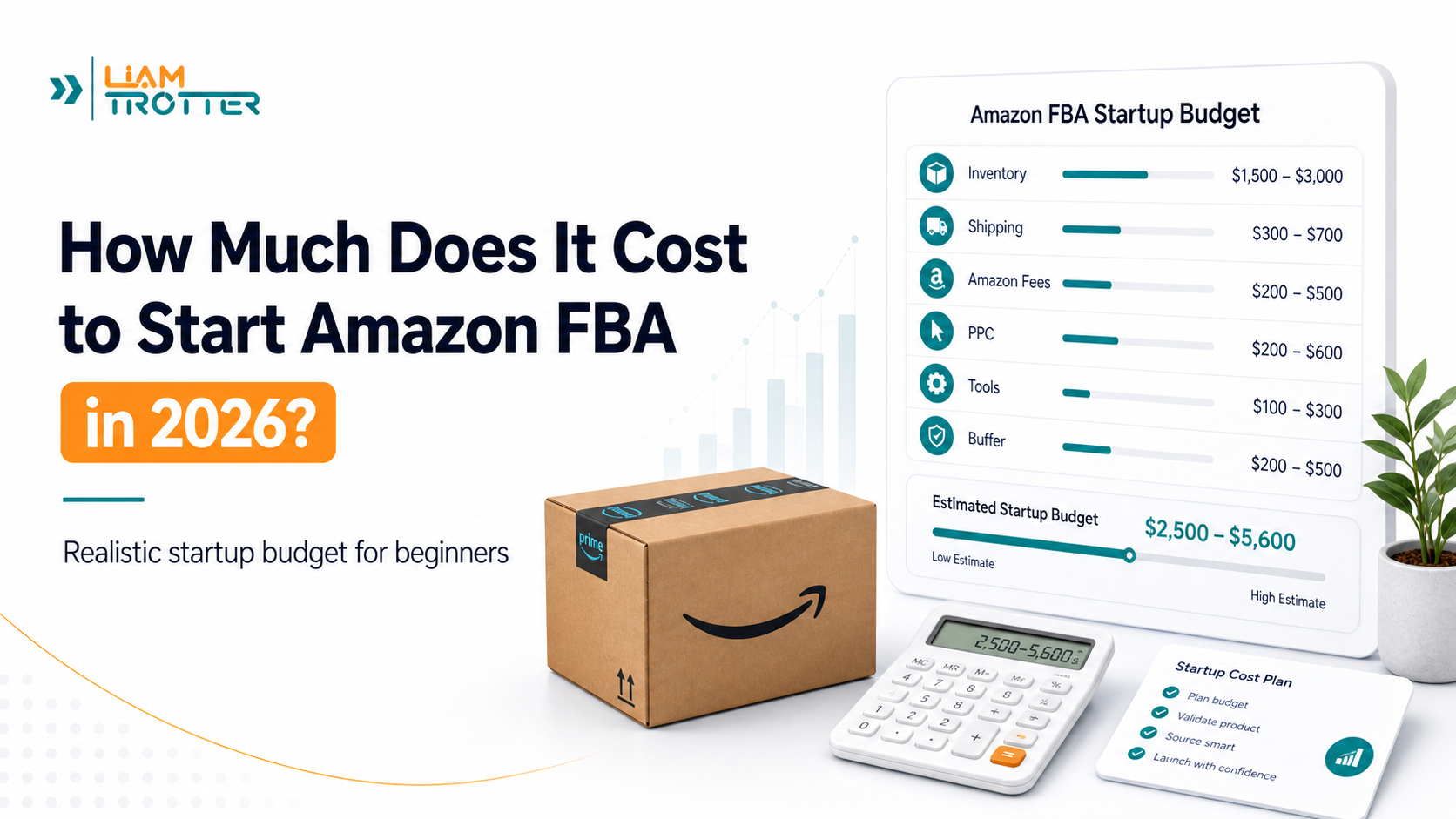
So, how much does it cost to start Amazon FBA? For many beginners, a realistic launch budget often falls somewhere between $2,500 and $5,000. Some sellers may test with less, but a full private-label FBA launch usually needs enough room for inventory, shipping, Amazon fees, product photos, PPC, and unexpected costs. If you want to estimate your own launch numbers, you can also use our Amazon FBA cost calculator before buying inventory.
The goal is not to start with the lowest possible number. The goal is to start with a realistic budget, a simple product, and enough cash to avoid running out of money before your listing has a real chance to perform.
Quick Answer: How Much Does It Cost to Start Amazon FBA?
For many beginners, a realistic Amazon FBA startup cost in 2026 is often around $2,500 to $5,000 for a controlled beginner launch. This range can cover product samples, a small first inventory order, shipping, Amazon seller account costs, basic listing assets, a small PPC launch budget, and a safety buffer.
You can start learning Amazon FBA with much less, and some sellers may test very small ideas with a lean budget. But launching a real inventory-based FBA product usually requires more than just opening a seller account. You need enough room for inventory, shipping, Amazon fees, listing preparation, ads, and unexpected problems.
If you are asking how much money you need to start Amazon FBA, think of the budget in layers: learning and research, samples, inventory, shipping, seller account costs, Amazon FBA fees, listing assets, PPC testing, and emergency buffer. The more serious the launch, the more room you need beyond inventory alone.
The best answer is not one fixed number. It depends on your launch style, product type, supplier, shipping method, first order size, and how much risk you can realistically handle.
Amazon FBA Startup Cost at a Glance
| Startup Style | Estimated Budget | What This Actually Covers | Beginner Note |
|---|---|---|---|
| Learning-only budget | $0–$300 | Education, product research, free tools, competitor analysis, and basic validation | Good for learning, but not a real FBA launch |
| Lean test budget | $500–$1,500 | Limited samples, very small inventory tests, simple sourcing experiments, and minimal tools | Possible, but tight and fragile |
| Controlled beginner launch | $2,500–$5,000 | Samples, first inventory order, shipping, seller account costs, listing assets, PPC testing, and buffer | Most realistic range for serious beginners |
| Comfortable launch | $5,000–$10,000+ | More inventory, better listing assets, stronger PPC testing, inspection, prep, and extra safety buffer | More flexible, but still not guaranteed |
These numbers are estimates, not fixed rules. A small, lightweight product may cost much less to launch than a heavy, fragile, oversized, or highly regulated product. A beginner who uses free research methods and starts with a controlled first order may spend less than someone who pays for tools, professional photography, larger inventory, and a bigger PPC campaign from day one.
Want to estimate your own launch budget? Use the Amazon FBA cost calculator to test different inventory, shipping, PPC, tools, and buffer scenarios before you buy inventory.
Startup Costs vs Amazon FBA Fees
This guide focuses on Amazon FBA startup costs: the money you may need before and during your first launch, such as samples, inventory, shipping, listing assets, PPC, and buffer.
If you want a fee-by-fee breakdown of referral fees, fulfillment fees, storage fees, return-related costs, removal fees, and 2026 fee changes, read our Amazon FBA fees guide.
The biggest mistake is not starting small. The biggest mistake is starting without knowing where the money will go.
Amazon FBA Startup Cost Breakdown by Budget Type
Not every Amazon FBA beginner starts with the same budget or the same business model. Someone testing a few products with a very small budget is not in the same position as someone launching a private-label product with custom packaging, professional images, and a planned PPC campaign.
That is why it is better to think in budget levels instead of looking for one perfect number.
Learning-Only Budget: $0–$300
A learning-only budget is not a real Amazon FBA launch budget. It is the amount you might spend while learning how Amazon FBA works, researching products, studying competitors, and understanding the numbers before you commit to inventory.
At this stage, you may spend money on:
- basic education or courses
- free or low-cost product research methods
- limited tool trials
- a small number of product samples
- basic business setup costs, if needed
This budget is useful if you are still deciding whether Amazon FBA is right for you. You can learn a lot without buying inventory, but you are not truly launching an FBA business until you source a product and send inventory to Amazon.
Lean Test Budget: $500–$1,500
A lean test budget may work for a very small experiment, but it is tight. With this range, you need to be careful with every cost because one expensive mistake can use up most of the budget.
This type of budget may work if:
- the product is inexpensive to source
- the item is small and lightweight
- you start with very limited inventory
- you avoid unnecessary paid tools
- you keep your PPC or launch spending very controlled
- you are testing demand rather than trying to scale quickly
The main risk is that you may not have enough room for proper samples, shipping, product photos, PPC testing, or unexpected costs. A lean budget can help you start learning, but it can also force you into shortcuts that hurt your launch.
Controlled Beginner Launch Budget: $2,500–$5,000
For many serious beginners, a controlled launch budget is the most realistic starting point. This range gives you more room to order samples, buy a reasonable first batch of inventory, ship products properly, create a decent listing, and test your launch with a modest PPC budget.
A controlled beginner launch can usually cover:
- product samples
- a small first inventory order
- Amazon seller account costs
- product ID or barcode costs, if required
- shipping or freight
- basic product photos or listing assets
- a small Amazon PPC launch budget
- a buffer for delays, returns, or extra costs
This does not mean you should spend the full amount blindly. It means you have enough room to make more careful decisions without depending on a perfect launch from day one.
Comfortable Launch Budget: $5,000–$10,000+
A comfortable launch budget gives you more flexibility. It may allow you to order more inventory, improve your product packaging, invest in better images, test PPC more effectively, and absorb delays without immediately running out of cash.
This can be useful if you are launching a more serious private-label product, but a higher budget does not guarantee higher profit. Spending more only helps if the product is well researched, the margins make sense, and the launch is managed carefully.
A bigger budget can make the launch less fragile, but it can also make mistakes more expensive. If you choose the wrong product, ignore your costs, or over-order inventory, a larger budget can disappear quickly.
Amazon FBA Startup Cost vs FBA Fees vs Monthly Costs
Before you build your budget, it helps to separate three things that beginners often mix together: startup costs, Amazon FBA fees, and monthly costs.
They are related, but they are not the same.
Amazon FBA Startup Costs
Amazon FBA startup costs are the expenses you usually pay before or during your first launch.
These can include:
- product samples
- first inventory order
- shipping or freight
- Amazon seller account setup
- product ID or barcode costs, if required
- product photography or listing assets
- PPC launch budget
- packaging or prep costs
- emergency buffer
In simple terms, startup costs are the money you need to get your first product ready, listed, shipped, and launched.
Amazon FBA Fees
Amazon FBA fees are the fees Amazon charges when you use its fulfillment network. These fees are usually connected to storing, handling, packing, shipping, and processing your products. You should always check Amazon’s current FBA fee information before estimating your margins. For a beginner-friendly breakdown of referral fees, fulfillment fees, storage fees, return-related costs, removal fees, and 2026 fee changes, read our detailed guide to Amazon FBA fees.
Common Amazon FBA fees include:
- fulfillment fees
- monthly storage fees
- referral fees
- removal or disposal fees
- returns processing fees, depending on the category
- aged inventory or long-term storage-related fees
These fees affect your profit margin, but they are not the same as your full startup budget. For example, buying your first inventory order is a startup cost, while paying Amazon to fulfill each order is an FBA-related selling cost.
Monthly Costs
Monthly costs are the recurring expenses you may keep paying after your initial setup.
These can include:
- Amazon Professional seller plan
- product research tools
- keyword or listing tools
- inventory storage fees
- PPC advertising
- bookkeeping or accounting software
- prep center or inspection services, if used
Some monthly costs are optional at the beginning. For example, paid product research tools can be helpful, but they are not always required from day one. Other recurring costs, such as account fees or storage fees, depend on how you choose to sell and how much inventory you send to Amazon.
Why This Difference Matters
If you mix all these costs together, Amazon FBA can look either cheaper or more expensive than it really is.
A beginner might think, “I only need the seller account fee to start,” but that ignores inventory, shipping, samples, PPC, and listing preparation. Another beginner might see a long list of FBA fees and assume they need to pay all of them upfront, which is not always true.
The better approach is to separate your budget into three parts:
| Cost Type | When You Pay It | Examples |
|---|---|---|
| Startup costs | Before or during launch | Samples, inventory, shipping, listing assets, launch budget |
| FBA fees | When Amazon stores or fulfills your products | Fulfillment fees, storage fees, returns, removal fees |
| Monthly costs | Recurring during operation | Seller plan, tools, ads, storage, software |
Once you understand the difference, it becomes much easier to build a realistic Amazon FBA budget and avoid surprises later.
If you are wondering how much it costs to start an Amazon business, the answer depends on the model. Selling used books, retail arbitrage, wholesale, private label, FBM, and Amazon FBA can all have different startup costs. This guide focuses on an inventory-based Amazon FBA launch, where product samples, inventory, shipping, listing assets, PPC, and buffer usually matter more than the seller account fee alone.
Main Amazon FBA Startup Costs
Once you understand the difference between startup costs, FBA fees, and monthly costs, the next step is to look at where your money actually goes.
Most Amazon FBA startup budgets are built around the same core cost categories: samples, inventory, shipping, seller account costs, product identifiers, listing assets, PPC, and a buffer for mistakes or delays.
Here is a simple overview before we break each one down:
| Startup Cost | Typical Role in Your Budget | Beginner Notes |
|---|---|---|
| Product samples | Helps you test quality before ordering inventory | Do not skip this step |
| First inventory order | Usually the biggest upfront cost | Depends on product cost and quantity |
| Amazon seller account | Lets you sell on Amazon | Individual or Professional plan |
| Product ID or barcode | May be needed to list your product | Requirements vary by product and brand setup |
| Product research tools | Helps with demand, competition, and keyword research | Optional, but useful |
| Shipping and freight | Gets inventory from supplier to Amazon or a prep center | Can change quickly based on size and weight |
| Listing photos and design | Helps your product convert visitors into buyers | Quality matters, but avoid overspending early |
| PPC launch budget | Helps your new listing get visibility | Keep it controlled and data-driven |
| Emergency buffer | Covers mistakes, delays, and hidden costs | Very important for beginners |
Product Samples
Product samples are one of the first real costs many Amazon FBA sellers face. Before you place a full inventory order, you need to see the product, touch it, test it, compare suppliers, and check whether the quality matches what the supplier promised.
Skipping samples can be expensive. A product may look good in supplier photos but feel cheap, break easily, arrive with poor packaging, or fail to match the dimensions you expected.
For beginners, samples may cost anywhere from a small amount to a few hundred dollars depending on the product, supplier, shipping method, and how many suppliers you test. Even if you are trying to keep your Amazon FBA startup cost low, samples are usually worth budgeting for.
A good approach is to order samples from more than one supplier if possible. This helps you compare quality, packaging, communication, and shipping speed before committing to inventory.
First Inventory Order
Your first inventory order is usually the biggest Amazon FBA startup cost.
This is where your budget can change dramatically. A small, lightweight product with a low unit cost may be manageable for a beginner. A heavy, fragile, oversized, or complex product can require much more capital before you even launch.
For example, if you choose a simple product that costs around $4 to $5 per unit and you order 200 units, your inventory cost would be around:
200 units × $4–$5 = $800–$1,000
That is only the product cost. It does not include shipping, packaging, prep, Amazon fees, PPC, photos, or a safety buffer.
This is why beginners should avoid thinking only in terms of “product cost.” The real number that matters is your landed cost, which includes the product, shipping, prep, and any other cost needed to get the product ready to sell.
A controlled first order is usually better than a large risky order. You want enough inventory to test demand and collect data, but not so much that one bad product decision locks up all your cash.
Amazon Seller Account
To sell on Amazon, you need an Amazon seller account. Amazon generally offers two selling plans: Individual and Professional.
The Individual plan may make sense if you are testing slowly or selling fewer items. The Professional plan is usually better for sellers who plan to build a more serious Amazon business, because it gives access to more selling features and avoids the per-item fee structure of the Individual plan.
Keep in mind that Amazon’s Individual and Professional selling plans are not the same as your legal business structure. If you are confused about seller plans versus business setup, read our guide on whether you need an LLC to sell on Amazon.
For a real Amazon FBA launch, many sellers eventually use the Professional plan, but you should always check Amazon’s current selling plan pricing before making a decision.
When budgeting, do not think only about the first month. It may take time to finish product research, contact suppliers, order samples, produce inventory, ship products, and start selling. Because of that, it is often safer to budget for two to three months of account costs before expecting the product to generate steady sales.
Product ID or Barcode
Depending on your product and listing setup, you may need a product identifier such as a UPC or GTIN. Many sellers use GS1 barcodes because Amazon may require valid product identifiers for listings.
This cost is not usually the largest part of the budget, but beginners often forget it.
Before buying inventory, check what Amazon requires for your specific product, brand situation, and category. Some sellers may qualify for a GTIN exemption, while others may need to purchase a barcode before creating the listing.
The key point is simple: do not wait until the last minute to understand product ID requirements. A small barcode or listing issue can delay your launch.
Product Research Tools
Product research tools can help you estimate demand, competition, keyword opportunities, sales volume, review strength, and product trends.
Paid tools can be useful, but they are not always required from day one. If your budget is tight, you can start with free or low-cost research methods such as:
- Amazon Best Sellers
- Amazon search suggestions
- competitor listings
- customer reviews
- Google Trends
- free trials or limited versions of product research tools
The mistake is not using free tools. The mistake is relying on any tool blindly.
A tool can help you collect data faster, but it cannot guarantee that a product will be profitable. You still need to check the product’s cost, fees, shipping, competition, reviews, and differentiation potential.
For beginners, paid tools should support your decision-making, not replace it.
Shipping and Freight
Shipping is one of the most important costs to calculate before starting Amazon FBA. It can make a product look profitable on paper and then destroy the margin once the real landed cost is calculated.
Shipping cost depends on:
- product size
- product weight
- number of units
- supplier location
- shipping method
- packaging dimensions
- whether you ship directly to Amazon or use a prep center
- whether you ship domestically or internationally
Small and lightweight products are usually easier for beginners because they are cheaper to ship, easier to store, and less risky to handle. Heavy or oversized products can create higher inbound shipping costs, higher storage costs, and higher fulfillment fees.
This is why product choice and startup cost are connected. A product that costs $3 per unit may not be a good opportunity if shipping adds too much cost per unit.
Before placing your first inventory order, estimate shipping as part of your landed cost, not as a separate afterthought.
Listing Photos and Design
Your Amazon listing is where shoppers decide whether to click, trust, and buy your product. That means product photos, image quality, title clarity, bullet points, and listing design can affect your conversion rate.
You do not always need a large creative budget at the beginning, but you do need a listing that looks trustworthy.
Depending on your product and budget, listing costs may include:
- product photography
- image editing
- infographic images
- lifestyle images
- copywriting
- keyword optimization
- basic branding or packaging design
Beginners should avoid two extremes.
The first mistake is spending too much on branding before validating the product. The second mistake is using weak photos that make the product look cheap or untrustworthy.
A practical middle ground is to create a clean, clear, conversion-focused listing first, then improve it as you collect data.
PPC Launch Budget
Amazon PPC can help a new product get visibility when it has no sales history, few or no reviews, and limited organic ranking.
You do not need to spend aggressively from day one, but you should budget for controlled testing if you want to give your product a fair chance.
A beginner PPC budget may be used to:
- test automatic campaigns
- discover real search terms
- collect click and conversion data
- identify keywords that may deserve manual campaigns
- support early ranking and visibility
The goal is not to “throw money at ads.” The goal is to learn which keywords attract relevant shoppers and whether the product can convert.
If your startup budget does not include any room for PPC, your launch may depend too heavily on organic visibility, which is difficult for a new listing.
Emergency Buffer
A safety buffer is one of the most underrated parts of an Amazon FBA startup budget.
Beginners often calculate the obvious costs and forget that things can go wrong. A supplier may charge more for shipping. A sample may need to be reordered. Some units may arrive damaged. Packaging may need to be fixed. PPC may need more testing. Amazon may delay receiving inventory.
A buffer helps you avoid running out of money when the launch does not go exactly as planned.
Common reasons to keep a buffer include:
- shipping cost changes
- damaged inventory
- product returns
- extra samples
- prep or packaging issues
- storage fees
- PPC testing
- delays before sales begin
- supplier or inspection problems
A good Amazon FBA budget should leave room for more than inventory. You still need money to launch, advertise, improve, and recover from mistakes.
Amazon FBA Startup Budget Template: Example Beginner Budget
You can use the example below as a simple Amazon FBA startup budget template. Replace the sample numbers with your own supplier quotes, shipping estimates, seller account costs, listing assets, PPC plan, tools, and emergency buffer before buying inventory.
To make these numbers easier to understand, let’s use a simple beginner-friendly product example.
In the main Amazon FBA beginner guide, we used a basic weed removal tool as an example of a simple product idea. It is not fragile, does not require complex electronics, and can be easier to understand than a highly technical or oversized product.
For this example, let’s assume:
- The product costs around $4 to $5 per unit
- You start with 200 units
- The product is relatively simple and lightweight
- You want a controlled beginner launch, not an aggressive launch
The first inventory order would look like this:
200 units × $4–$5 per unit = $800–$1,000
But inventory is only one part of the total budget. A more realistic beginner budget needs to include samples, shipping, account costs, listing assets, PPC, and a buffer.
| Cost Item | Example Estimate | Notes |
|---|---|---|
| Product samples | $50–$200 | Order samples before committing to inventory |
| First inventory order | $800–$1,000 | Based on 200 units at $4–$5 per unit |
| Shipping and freight | $200–$600 | Depends on product size, weight, supplier location, and shipping method |
| Amazon seller account | $40–$120 | Estimate for 1–3 months of account costs |
| Product ID or barcode | $30+ | If required for your product or listing setup |
| Basic listing assets | $100–$500 | Photos, editing, graphics, or listing support |
| PPC launch budget | $300–$1,000 | Controlled ad testing after launch |
| Tools or software | $0–$300 | Optional at the beginning |
| Emergency buffer | $300–$800 | Covers delays, returns, extra shipping, prep issues, or mistakes |
| Estimated Total | $1,820–$4,550 | Example only; your real cost may be higher or lower |
This example shows why Amazon FBA startup cost is more than just the product price.
A beginner may look at the inventory cost and think the launch only requires around $800 to $1,000, but the real launch budget can quickly move closer to $2,000 to $4,500+ once shipping, listing setup, PPC, and a safety buffer are included.
This does not mean every beginner must spend the high end of the range. It means you should know the full cost picture before ordering inventory.
The safer approach is to calculate your total launch budget before you pay the supplier. That way, you are not surprised later when you still need money for shipping, Amazon setup, product photos, ads, or unexpected delays.
You can also use the Amazon FBA cost calculator to test different inventory, shipping, PPC, and buffer scenarios before choosing your launch budget.
How Much Inventory Should Beginners Start With?
One of the hardest parts of starting Amazon FBA is deciding how much inventory to order for your first launch.
If you order too little, you may run out of stock quickly, pay a higher cost per unit, or fail to collect enough sales data. If you order too much, you may tie up too much cash in one unproven product and increase your storage, shipping, and inventory risk.
For beginners, the goal is not to order as much inventory as possible. The goal is to place a controlled first order that gives you enough units to test demand without putting too much capital at risk.
A good first inventory order depends on:
- your product cost per unit
- supplier minimum order quantity
- shipping cost per unit
- expected demand
- available cash
- storage risk
- PPC launch plan
- how quickly you can reorder if the product works
In the weed removal tool example, we used 200 units as a controlled first order. That does not mean 200 units is the right number for every product. It simply gives us a practical example of how inventory cost can fit into a beginner budget.
A lower-cost product may allow you to start with more units. A higher-cost product may require a smaller first order. A product with long production or shipping times may need more planning because running out of stock can hurt momentum after launch.
Here is a simple way to think about it:
| Inventory Approach | What It Means | Main Risk |
|---|---|---|
| Very small order | Minimal inventory to test demand | May run out quickly or have high unit costs |
| Controlled first order | Enough units to test sales without overcommitting | Requires careful budgeting |
| Large first order | More inventory and more room to scale | Higher cash risk if the product fails |
For most beginners, a controlled first order is safer than trying to “go big” immediately.
You want enough inventory to learn from real sales, reviews, PPC data, and customer behavior. But you also want enough cash left for shipping, ads, listing improvements, and unexpected costs.
A common beginner mistake is spending almost the entire budget on inventory. This can create problems because launching an Amazon FBA product requires more than having units in stock. You still need money to send the inventory, advertise the listing, fix issues, and keep the business running while you wait for results.
Before placing your first order, ask yourself:
- If this product sells slowly, can I afford to wait?
- If shipping costs more than expected, do I still have a buffer?
- If PPC needs testing, do I have money left for ads?
- If the supplier requires a higher MOQ, does the product still make sense?
- If I need to reorder quickly, how long will production and shipping take?
Your first inventory order should help you test the opportunity, not trap your entire budget in one product.
Can You Start Amazon FBA With $500?
Yes, you can start learning and testing Amazon FBA with $500, but you should be careful with what that really means.
A $500 budget may be enough to research products, test a few samples, use free tools, prepare your seller account, or try a very small resale or sourcing experiment. But for a full Amazon FBA launch with inventory, shipping, listing assets, PPC, and a safety buffer, $500 is usually very tight.
With a $500 budget, you may be able to cover things like:
- basic product research
- one or two product samples
- limited business setup costs
- a small amount of inventory for a very simple product
- free or low-cost tools
- early supplier communication
But $500 may not be enough to comfortably cover:
- a real first inventory order
- inbound shipping to Amazon
- product photography or listing assets
- Amazon PPC testing
- packaging or prep costs
- returns, delays, or damaged units
- a useful emergency buffer
The main risk with starting Amazon FBA with $500 is that you may be forced to cut corners. You might skip samples, order too little inventory, avoid ads completely, or choose a product only because it is cheap instead of because it is a good opportunity.
That can make the launch fragile.
A better way to think about a $500 budget is this: use it to learn, validate, and prepare before committing to a larger launch. You can study the market, compare products, talk to suppliers, order samples, and build a realistic plan.
If you want to launch a serious private-label Amazon FBA product, it is usually safer to have more than $500 available. A controlled beginner budget gives you more room to make careful decisions instead of depending on everything going perfectly.
Can You Start Amazon FBA With $100 or No Money?
You can start learning Amazon FBA with $100 or even with no money, but you cannot realistically launch an inventory-based Amazon FBA business for free.
This is an important difference.
With little or no money, you can still do useful work. You can learn how Amazon FBA works, study product research, compare competitors, understand Amazon fees, watch tutorials, read seller forums, and build a basic launch plan before spending anything.
With around $100, you may also be able to test a few small things, such as:
- using a low-cost tool trial
- ordering one inexpensive product sample
- setting up basic business research
- studying competitors manually
- testing product ideas before contacting suppliers
But $100 is usually not enough to cover the real costs of launching an Amazon FBA product.
To launch, you normally need money for:
- product samples
- inventory
- shipping
- Amazon seller account costs
- packaging or prep
- product photos or listing assets
- PPC testing
- unexpected delays or mistakes
The biggest issue is inventory. Amazon FBA is an inventory-based business model. That means you need products to send to Amazon before customers can buy them. Even if you choose a simple product, the cost of inventory and shipping alone can quickly exceed a very small budget.
This does not mean you should give up if you do not have much money right now. It means your first goal should be preparation, not launch.
If your budget is very small, use that stage to:
- learn product research
- understand FBA fees
- study simple product categories
- compare suppliers
- build a product checklist
- estimate startup costs
- save for a controlled first order
Starting with no money is possible as a learning phase. Starting Amazon FBA as a real inventory business with no money is not realistic.
A smarter approach is to use the early stage to avoid expensive mistakes, then launch only when you have enough budget for inventory, shipping, ads, and a safety buffer.
Amazon FBA Costs Beginners Often Forget
When beginners estimate Amazon FBA startup cost, they usually focus on the obvious expenses: inventory, shipping, and the seller account.
Those costs matter, but they are not the whole picture.
Many Amazon FBA launches become stressful because the seller forgets smaller costs that appear later. These costs may not look serious individually, but together they can reduce profit, delay your launch, or force you to spend money you did not plan for.
Here are some common costs beginners often forget:
| Forgotten Cost | Why It Matters |
|---|---|
| Product samples | You may need to test more than one supplier before choosing |
| Extra shipping charges | Freight or delivery costs can change after the first quote |
| Packaging changes | Your product may need better packaging before Amazon accepts or customers trust it |
| Prep or labeling issues | Incorrect labels or packaging can delay receiving at Amazon |
| Product inspection | Helps reduce the risk of poor-quality inventory |
| Damaged units | Some units may arrive damaged or become unsellable |
| Returns and refunds | Returned products can reduce real profit |
| Storage fees | Slow-moving inventory can become more expensive over time |
| PPC testing | New listings often need ad testing to get visibility |
| Tool subscriptions | Monthly tools can add up if you forget to cancel or budget for them |
| Cash flow gap | You may not recover your money immediately after launch |
One of the most important hidden costs is the cash flow gap. Even if your product starts selling, you may not immediately have all your money back. You may need to wait for sales, Amazon payouts, reviews, PPC data, and reorder decisions.
This is why a safety buffer matters.
A beginner who spends the full budget on inventory may have no money left to fix problems. If shipping costs increase, if PPC needs more testing, or if some units are damaged, the launch becomes harder to manage.
It is better to plan for imperfect conditions from the beginning.
A realistic Amazon FBA budget should assume that something may cost more than expected. That does not mean you should overspend. It means you should avoid building a budget that only works if everything goes perfectly.
How Product Choice Affects Amazon FBA Startup Cost
Your product choice has a huge impact on how much it costs to start Amazon FBA.
Two beginners can start with the same budget and have completely different results because they choose different types of products. A small, simple, lightweight product is usually much easier to manage than a heavy, fragile, oversized, or highly regulated product.
This is why product research is not only about finding demand. It is also about understanding cost and risk.
A beginner-friendly product can help reduce:
- shipping costs
- storage costs
- packaging complexity
- return risk
- prep problems
- fulfillment fees
- upfront inventory cost
A risky product can increase almost every part of your budget.
For example, a small garden tool may be easier to ship and store than a large home appliance or fragile glass item. Even if both products have demand, the second product may require more packaging, higher shipping costs, more quality control, and a larger safety buffer.
Here is a simple comparison:
| Product Type | Startup Cost Impact | Beginner Risk |
|---|---|---|
| Small and lightweight | Lower shipping and storage costs | Lower |
| Simple and non-fragile | Easier prep and fewer damage issues | Lower |
| Oversized | Higher shipping, storage, and fulfillment costs | Higher |
| Fragile | More packaging, damage, and return risk | Higher |
| Highly seasonal | Risk of slow sales after peak season | Higher |
| Restricted or regulated | More compliance and approval issues | Higher |
This does not mean every small product is a good product. A small product can still be too competitive, too low-margin, or hard to differentiate. But from a startup cost perspective, simple and lightweight products usually give beginners more flexibility.
Before choosing your first Amazon FBA product, ask:
- Is the product small enough to ship affordably?
- Is it simple to package and prep?
- Is it fragile or easy to damage?
- Does it require special approval or compliance?
- Can the selling price support product cost, shipping, Amazon fees, and PPC?
- Can I order a controlled first batch without using my entire budget?
The cheaper product is not always the better product. The better product is the one that gives you a realistic chance to make a profit after all costs are included.
That is why product choice should come before inventory spending. If you choose a product without understanding the full cost picture, your Amazon FBA startup budget can disappear faster than expected.
How to Reduce Your Amazon FBA Startup Costs
You do not need to spend money on everything at once when starting Amazon FBA. A smart beginner budget is not about being cheap; it is about spending money where it reduces risk and avoiding costs that do not help you validate the product.
Here are practical ways to reduce your Amazon FBA startup costs without weakening your launch.
Start With a Simple Product
Simple products are usually easier to source, ship, inspect, package, and explain in a listing.
Avoid starting with products that are:
- oversized
- fragile
- highly technical
- heavily regulated
- expensive to ship
- difficult to differentiate
- likely to have high return rates
A simple product will not guarantee success, but it can reduce the number of things that can go wrong in your first launch.
Order Samples Before Buying Inventory
Samples cost money, but they can save you from a much bigger mistake.
A sample helps you check:
- product quality
- packaging
- size and weight
- supplier communication
- shipping time
- whether the product matches the listing or supplier photos
Skipping samples may lower your upfront cost, but it increases the risk of receiving inventory you cannot confidently sell.
Keep Your First Order Controlled
Do not use your entire budget on the first inventory order.
A controlled first order helps you test the product with less risk. You want enough units to learn from real sales, but not so many that your cash is trapped if the product does not perform as expected.
Before increasing order quantity, look for real signs such as:
- steady sales
- acceptable PPC performance
- positive customer feedback
- manageable return rate
- clear reorder potential
Use Free Research Methods First
Paid tools can be useful, but you do not need to subscribe to every tool before you understand the basics.
You can start with free or low-cost methods such as:
- Amazon Best Sellers
- Amazon search suggestions
- competitor listings
- customer reviews
- Google Trends
- free trials
- manual price and review analysis
Use paid tools when they help you make a better decision, not because you feel you cannot start without them.
Compare Multiple Suppliers
Do not accept the first quote you receive.
Compare suppliers based on:
- unit price
- sample quality
- minimum order quantity
- production time
- communication quality
- packaging options
- ability to follow Amazon FBA requirements
- shipping support
The cheapest supplier is not always the best supplier. Poor quality, bad packaging, or weak communication can cost more later than a slightly higher unit price.
Calculate Landed Cost Before Ordering
Your product cost is not your real cost.
Before placing an order, estimate your landed cost, which includes:
- product cost
- shipping
- packaging
- prep
- inspection, if used
- duties or import-related costs, if applicable
- any other cost needed to make the product ready to sell
If the product only looks profitable before shipping and prep are added, it may not be a good opportunity.
Keep PPC Spending Controlled
PPC can help your product get visibility, but it should not be uncontrolled spending.
Start with a small, structured campaign and watch the data. Your goal is to learn which keywords attract relevant shoppers and whether your product converts.
Avoid launching with a large ad budget before you understand:
- your break-even point
- your target profit margin
- your conversion rate
- your most relevant keywords
- your maximum acceptable cost per sale
Leave Room for a Buffer
A budget with no buffer is fragile.
Even a simple launch can face delays, damaged units, extra shipping costs, or PPC testing needs. If every dollar is spent on inventory, you may not have enough money left to fix problems.
Try to keep part of your budget available for unexpected costs. That buffer can be the difference between a manageable launch and a stressful one.
Reducing your Amazon FBA startup cost is not about cutting every expense. It is about avoiding waste, validating before scaling, and keeping enough cash available to handle the realities of launching a product.
Is Amazon FBA Worth the Startup Cost?
Amazon FBA can be worth the startup cost, but only if the numbers make sense before you launch.
The mistake many beginners make is asking, “Can I afford to start?” without also asking, “Can this product realistically make a profit after all costs?”
A product may look attractive because it sells well or has strong demand, but that does not automatically make it a good FBA opportunity. You still need to account for product cost, shipping, Amazon fees, storage, PPC, returns, and the cash needed to reorder inventory if the product works.
Amazon FBA may be worth the startup cost if:
- you validate the product before ordering inventory
- the product has enough demand
- competition is manageable
- the selling price supports a healthy margin
- shipping and storage costs are reasonable
- you understand Amazon fees before launch
- you keep PPC spending controlled
- you start with a realistic first order
- you have enough buffer for delays or mistakes
Amazon FBA may not be worth the startup cost if:
- you choose a product based only on personal opinion
- you ignore shipping and FBA fees
- you buy too much inventory too early
- the product is heavy, fragile, or hard to prep
- you have no money left for ads or improvements
- you expect fast profit without testing
- your entire budget depends on one product working immediately
The question is not whether Amazon FBA is cheap or expensive. The better question is whether your product, budget, and launch plan give you a realistic chance to recover your costs and grow.
If you want the broader decision view, read our full guide on whether Amazon FBA is worth it in 2026, including the pros, cons, risks, profitability factors, and who should or should not start.
Does Spending More Mean You Will Make More Money?
No. A bigger budget can give you more flexibility, but it does not guarantee profit.
Spending more may help you order better samples, improve your listing, test more PPC campaigns, or avoid running out of stock too quickly. But if the product is weak, the margin is too small, or the competition is too strong, a bigger budget can simply make the mistake more expensive.
A smaller budget can also work if the seller is disciplined, chooses a simple product, validates carefully, and avoids unnecessary expenses.
The goal is not to spend the most money. The goal is to make better decisions with the money you have.
Before you invest in Amazon FBA, make sure you can answer these questions:
- What is my total landed cost per unit?
- What is my expected selling price?
- What are my Amazon fees?
- How much will I spend on PPC to test the product?
- What profit margin do I need?
- How many units do I need to sell to recover my initial investment?
- What happens if the product sells slower than expected?
If you cannot answer these questions yet, it is better to keep researching than to rush into buying inventory.
Frequently Asked Questions
Here are some of the most common questions beginners ask about Amazon FBA startup costs, budgets, fees, inventory, and launch planning.
How much money do you need to start Amazon FBA?
A realistic Amazon FBA startup budget for many beginners is often around $2,500 to $5,000. This can cover samples, a small first inventory order, shipping, Amazon seller account costs, basic listing assets, PPC testing, and a safety buffer.
Some sellers may start with less, especially if they use a very lean model, but a full inventory-based Amazon FBA launch usually needs more than just the seller account fee.
Can you start Amazon FBA with a limited budget?
Yes, you can start learning and testing Amazon FBA with a limited budget, but you should be careful about what that means.
A small budget is usually better for research, product samples, supplier communication, and basic validation. If you want to launch a real inventory-based FBA product, you still need enough room for inventory, shipping, listing assets, PPC testing, Amazon fees, and a safety buffer.
If your budget is limited, start with a simple product, keep the first order controlled, avoid oversized or fragile items, and do not spend all your cash on inventory.
Can I start Amazon FBA with $500?
You can start learning and testing Amazon FBA with $500, but it is usually too tight for a complete private-label FBA launch.
A $500 budget may help you research products, order a few samples, test a small sourcing idea, or prepare your launch plan. However, once you include inventory, shipping, listing assets, PPC, and unexpected costs, most serious launches need more room.
Can I start Amazon FBA with $100?
You can start learning Amazon FBA with $100, but launching a real FBA product with inventory is not realistic at that budget.
With $100, you may be able to use free resources, test a low-cost tool, study products, or order one small sample. But you will still need money for inventory, shipping, Amazon setup, and launch costs before you can sell through FBA.
Can you start Amazon FBA with no money?
You can learn about Amazon FBA with no money, but you cannot realistically launch an inventory-based FBA business without capital.
Amazon FBA requires products to sell. That means you eventually need money for samples, inventory, shipping, packaging, listing setup, and other launch expenses. If you have no budget yet, focus first on learning, researching products, and building a realistic plan.
How much does it cost to start an Amazon business?
The cost to start an Amazon business depends on the selling model. Retail arbitrage, wholesale, private label, FBM, and Amazon FBA can all require different budgets.
This article focuses on Amazon FBA startup costs. For a controlled FBA launch, many beginners may need around $2,500 to $5,000, while smaller budgets are usually better for learning, testing, samples, or very lean experiments.
What is the biggest Amazon FBA startup cost?
The biggest startup cost is usually your first inventory order. After that, the most important costs are usually shipping, product samples, listing assets, PPC testing, and a safety buffer.
The exact biggest cost depends on your product. A lightweight, simple product may be much cheaper to launch than a heavy, fragile, or oversized product.
How much does Amazon FBA cost per month?
Monthly Amazon FBA costs can include your seller account plan, storage fees, product research tools, PPC advertising, bookkeeping software, and any prep or inspection services you use.
Some monthly costs are optional at the beginning. For example, paid tools can help, but you can start with free research methods. Other costs, such as storage fees or advertising, depend on how much inventory you send and how you launch your product.
Do I need paid tools to start Amazon FBA?
No, paid tools are not required from day one.
You can start product research with free methods such as Amazon Best Sellers, Amazon search suggestions, competitor listings, customer reviews, and Google Trends. Paid tools can save time and provide useful estimates, but they should support your research, not replace your judgment.
How much inventory should beginners buy first?
Beginners should start with a controlled first order rather than buying as much inventory as possible.
The right number depends on product cost, supplier minimum order quantity, shipping cost, expected demand, and available budget. You want enough units to test the product, but not so many that one bad decision traps all your cash in unsold inventory.
Are Amazon FBA fees included in startup cost?
Some Amazon fees should be considered when planning your startup budget, but FBA fees are not the same as startup costs.
Startup costs include things like samples, inventory, shipping, listing assets, and launch ads. FBA fees include charges for fulfillment, storage, returns, and related Amazon services. You need to understand both to know whether your product can be profitable.
Is Amazon FBA expensive for beginners?
Amazon FBA can be expensive if you choose the wrong product, order too much inventory, ignore shipping costs, or launch without a clear budget.
But it can be manageable if you start with a simple product, calculate your landed cost, use a controlled first order, avoid unnecessary tools, and keep a safety buffer. The key is not to spend as little as possible; it is to spend carefully before you scale.
Final Thoughts
Amazon FBA does not have one fixed startup cost. The amount you need depends on your product, inventory size, supplier, shipping method, Amazon fees, listing quality, PPC budget, and how much room you leave for mistakes.
For many beginners, a realistic launch budget is often around $2,500 to $5,000, especially for a controlled first product launch. You may be able to start learning or testing with less, but trying to launch with too little money can force risky shortcuts.
So, how much does it cost to start Amazon FBA? For most beginners, the safer answer is not the lowest number possible, but the amount needed to launch with inventory, shipping, ads, and enough buffer to avoid risky shortcuts.
The smartest approach is not to spend the most money or the least money. It is to understand your numbers before you order inventory.
Start with a simple product. Order samples. Calculate your landed cost. Keep your first inventory order controlled. Leave room for shipping, ads, listing improvements, and unexpected costs. Most importantly, validate the product before committing too much capital.
If you are still early in the process, do not rush into buying inventory just because you want to start quickly. Use the planning stage to understand your budget, compare suppliers, estimate your fees, and make sure the product has a real chance to be profitable.
Amazon FBA can be a practical business model for beginners, but only when the launch is planned with realistic costs, clear margins, and controlled risk.
