

Amazon Product Opportunity Explorer is one of the most useful tools inside Seller Central for sellers who want to find product ideas using Amazon’s own data instead of relying only on guesswork, trends, or third-party estimates.
If you are trying to find a new product to sell on Amazon, the hard part is not only finding ideas. The harder part is understanding whether a niche has real customer demand, enough room for new offers, and signs that customers are not fully satisfied with what is already available.
That is where Product Opportunity Explorer can help. It gives sellers access to niche-level data based on Amazon customer search and purchase behavior, including search terms, products, click share, pricing, reviews, trends, and other signals that can help you decide whether a product idea deserves deeper research.
This guide explains how to use Amazon Product Opportunity Explorer in 2026, where to find it inside Seller Central, what the main metrics mean, how to read niche data, and how to use the tool as part of a broader Amazon FBA product research process.
Before we start, keep one thing in mind: Product Opportunity Explorer can help you find signals of demand and opportunity, but it does not guarantee that a product will sell. You still need to check Amazon fees, product cost, shipping, competition, restrictions, suppliers, and profit before buying inventory.
Quick Answer: What Is Amazon Product Opportunity Explorer?
Amazon Product Opportunity Explorer is a product research tool inside Seller Central that helps sellers discover product or offer ideas by analyzing Amazon customer demand, search behavior, purchasing behavior, existing products, reviews, pricing, and niche-level trends.
Instead of showing only one product, the tool organizes related search terms and products into what Amazon calls niches. A niche represents a specific customer need, such as a group of search terms and products that shoppers view or buy after searching for similar items.
You can use Product Opportunity Explorer to search or browse niches, review products within a niche, study customer search terms, compare click share, analyze trends, review customer feedback, and decide whether a market may have unmet demand or room for a better offer.
The simplest way to think about it is this: Product Opportunity Explorer helps you answer, “Is there a real customer need here, and are current products meeting that need well enough?”
For Amazon FBA sellers, that information can be especially useful before ordering samples, contacting suppliers, or building a launch plan. The tool can help you find promising niches, but the final product decision should still come after deeper validation.
Amazon Product Opportunity Explorer at a Glance
Use this quick overview before going deeper into the tool. Product Opportunity Explorer is best used as an early niche research layer inside Seller Central, not as the final decision before buying inventory.
| Question | Quick Answer | Why It Matters |
|---|---|---|
| What is it? | Amazon Product Opportunity Explorer is a product research tool inside Seller Central. | It helps sellers study Amazon customer demand, niches, search terms, clicked products, reviews, and trends. |
| Where is it? | You can usually find it in Seller Central under Growth → Product Opportunity Explorer. | This helps answer searches around Product Opportunity Explorer and Seller Central access. |
| Who can use it? | It is generally available to eligible sellers inside Seller Central, especially Professional sellers. | Beginners should understand access requirements before expecting to see the tool. |
| What does it show? | It can show niche data, search terms, top clicked products, click share, pricing, reviews, trends, and customer insights. | These signals help you decide whether a niche deserves deeper research. |
| What is it best for? | It is best for early niche discovery and understanding Amazon-side customer demand. | It can help you move from a broad product idea to a more specific opportunity to validate. |
| What should you do next? | Use the data as the first layer, then continue with full Amazon FBA product research. | You still need to check profit, FBA fees, suppliers, restrictions, samples, and competition before buying inventory. |
How Product Opportunity Explorer Works
Product Opportunity Explorer works by organizing Amazon customer search and purchase behavior into niche-level data. Instead of forcing you to analyze random products one by one, it helps you look at a broader market space and understand how customers search, click, buy, review, and return products inside that niche.
What Amazon Means by a Niche
In Product Opportunity Explorer, a niche is not just a single keyword. It is a group of related customer search terms and products that represent a specific customer need.
For example, shoppers might search for “stainless steel water bottle,” “BPA-free water bottle,” or “insulated water bottle.” These searches may be grouped around a broader customer need, such as a water bottle niche. Amazon uses patterns in what customers search for, view, and purchase to organize those terms and products into niche data.
This matters because customers do not always describe the same need in one exact way. One shopper may search for a product by material, another by feature, another by use case, and another by problem. A niche helps you look at the broader demand pattern instead of focusing on only one phrase.
When you open a niche, Product Opportunity Explorer can show you related products, search terms, insights, trends, reviews, purchase drivers, and returns. These sections help you understand what customers want and whether existing products are satisfying that demand.
Why Customer Search and Purchase Behavior Matter
Product research becomes stronger when you study what customers actually do, not only what sellers think might work.
Search terms can show what customers are looking for. Click data can show which products attract attention. Reviews can show what customers like or dislike. Trends can show whether demand is rising, falling, or seasonal. Return reasons can show problems that may hurt a product after launch.
That is why Product Opportunity Explorer can be valuable. It helps you move from a broad idea like “maybe I should sell storage organizers” to more specific questions:
- Are customers actively searching for this type of product?
- Are the top products dominated by one brand or spread across many sellers?
- Are customers clicking many different products or mostly one product?
- Are reviews strong, or do customers repeat the same complaints?
- Is the niche growing or seasonal?
- Are there signs of unmet demand or weak existing offers?
These questions do not replace full product validation, but they help you decide whether a product idea is worth the next stage of research.
Who Can Use Amazon Product Opportunity Explorer?
Product Opportunity Explorer is available inside Amazon Seller Central, but not every Amazon user can access it. You generally need access through a seller account, and Amazon’s help materials state that the tool is currently available to Professional sellers.
This means that if you are still only browsing Amazon as a customer, you may not see the tool. If you are still preparing to register, you can first read our guide on how to create an Amazon seller account.
Professional Seller Requirement
Amazon’s FAQ says Product Opportunity Explorer is currently available to Professional sellers. A Professional selling plan is different from forming a company or LLC. It is an Amazon selling plan that gives sellers access to more selling tools and features.
If you are using an Individual selling plan or you do not yet have Seller Central access, you may not be able to use Product Opportunity Explorer. Availability can also depend on your marketplace, account setup, permissions, and Amazon’s current rules.
If you are still deciding whether Amazon FBA is worth starting before paying for tools or account fees, read our guide on whether Amazon FBA is worth it in 2026.
User Permissions and Access Issues
If you have a Professional selling account but cannot see Product Opportunity Explorer, the issue may be related to user permissions. Amazon notes that access may be available to the primary user by default, and other users may need permission to view new product opportunities.
If the tool does not appear for a secondary user, check the user permissions inside Seller Central. In some cases, permissions may need to be managed through global permissions or account settings.
If you can access the tool but see a blank page, Amazon’s FAQ suggests that browser settings may be the issue. Clearing cookies or updating your browser may help. If the tool still does not appear, contact Amazon Selling Partner Support or check Seller Central help for the latest access guidance.
Also remember that not every search term or ASIN will return useful data. If your search term does not have enough volume, Product Opportunity Explorer may show no matching niches. If an ASIN is not mapped to a niche, that does not always mean the product is bad; it may simply not be grouped into a customer-need cluster inside the tool.
How to Access Amazon Product Opportunity Explorer in Seller Central
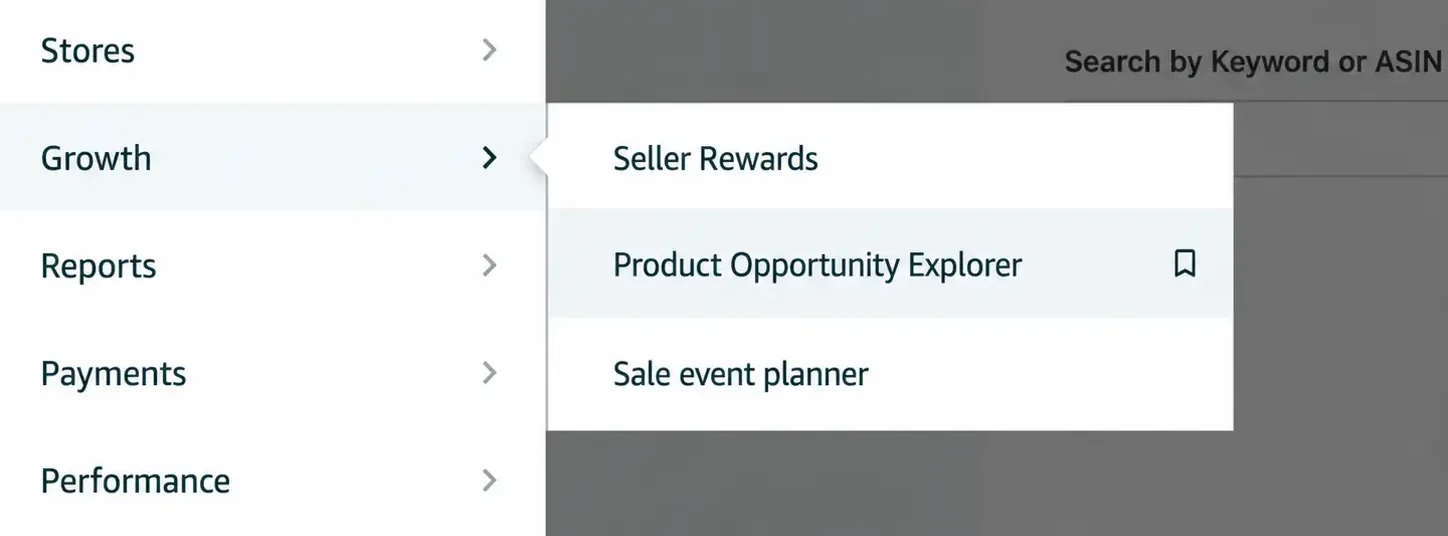
To access Amazon Product Opportunity Explorer, log in to your official Amazon Seller Central account. From the main menu, go to Growth, then select Product Opportunity Explorer. If you do not see the tool, check your selling plan, marketplace, and user permissions.
Once you open the tool, you can usually start in one of three ways:
- Search for a niche by entering a product keyword or phrase.
- Browse by category and move from a broad category into narrower subcategories.
- Use example niches suggested by Amazon based on your selling history or account data.
You may also be able to search by ASIN or switch between niche and ASIN views depending on what you are trying to analyze.
If you are researching a new product idea, start with a keyword or category. If you already have a specific product or competitor ASIN, ASIN search can help you compare that product with related products and niches.
The key is to treat the tool as a starting point. It helps you identify possible opportunity areas, but you still need to validate profit, Amazon fees, suppliers, restrictions, and launch difficulty before buying inventory.
How to Use Amazon Product Opportunity Explorer Step by Step
Amazon Product Opportunity Explorer becomes more useful when you use it in a clear step-by-step process. Instead of looking at one metric and making a fast decision, move through the tool in order: search for a niche, narrow the results, open the Niche Details page, review the main tabs, and decide whether the opportunity deserves deeper product research.
For this walkthrough, we will use the example of storage organizer in the United States marketplace. The goal is not to say this is automatically a winning niche. The goal is to show how to read the data and decide whether the niche deserves more validation.
Step 1: Search for a Niche Idea
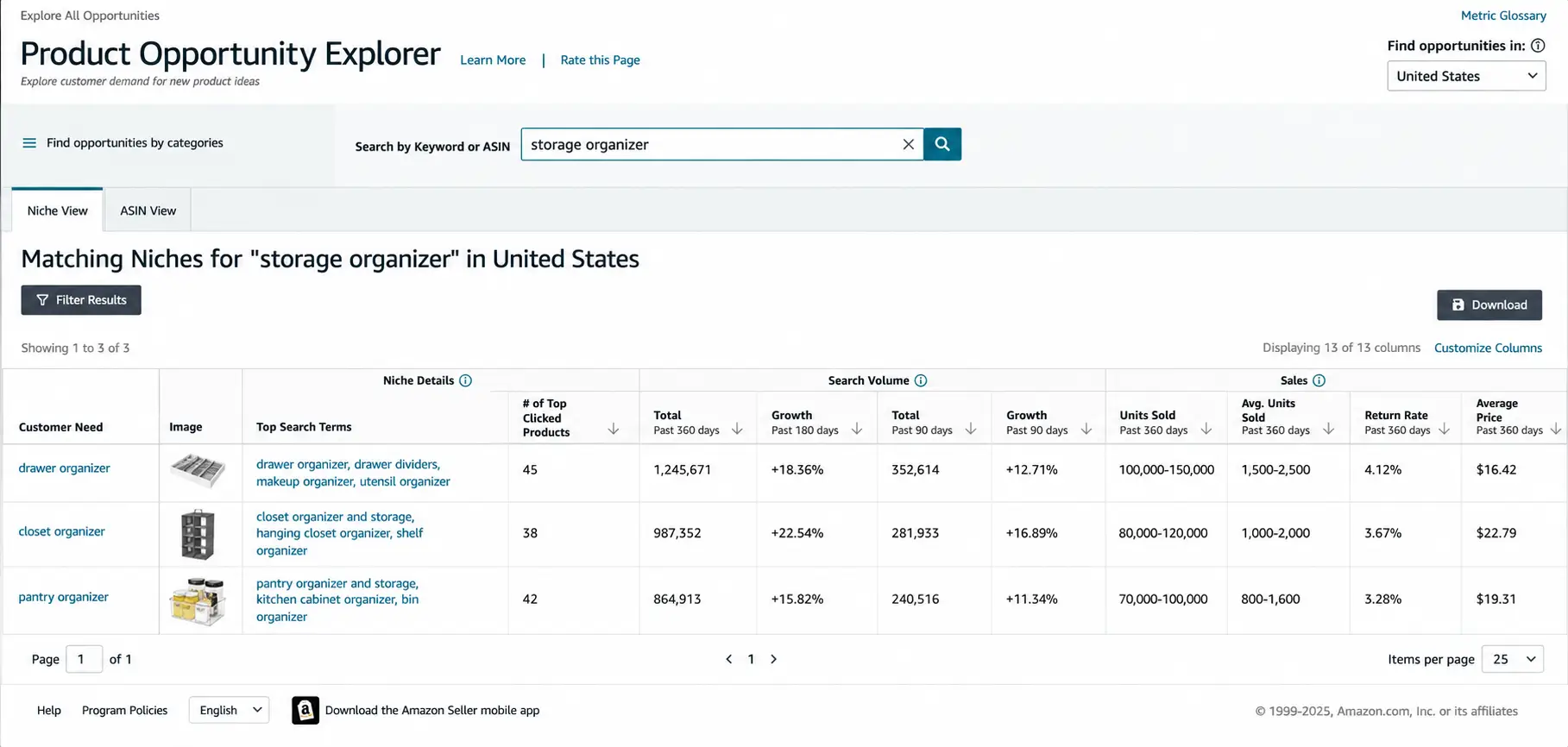
Start by entering a broad keyword related to the product idea you want to research. In this example, the search term is storage organizer. Product Opportunity Explorer will then show matching niches related to that customer need.
The matching niches table helps you compare several related opportunities before choosing one to investigate further. You may see related niches such as drawer organizers, closet organizers, pantry organizers, under-sink organizers, or storage bins.
At this stage, you are not choosing a final product. You are only deciding which niche looks interesting enough to open and analyze more deeply.
Step 2: Use Filters to Narrow Opportunities
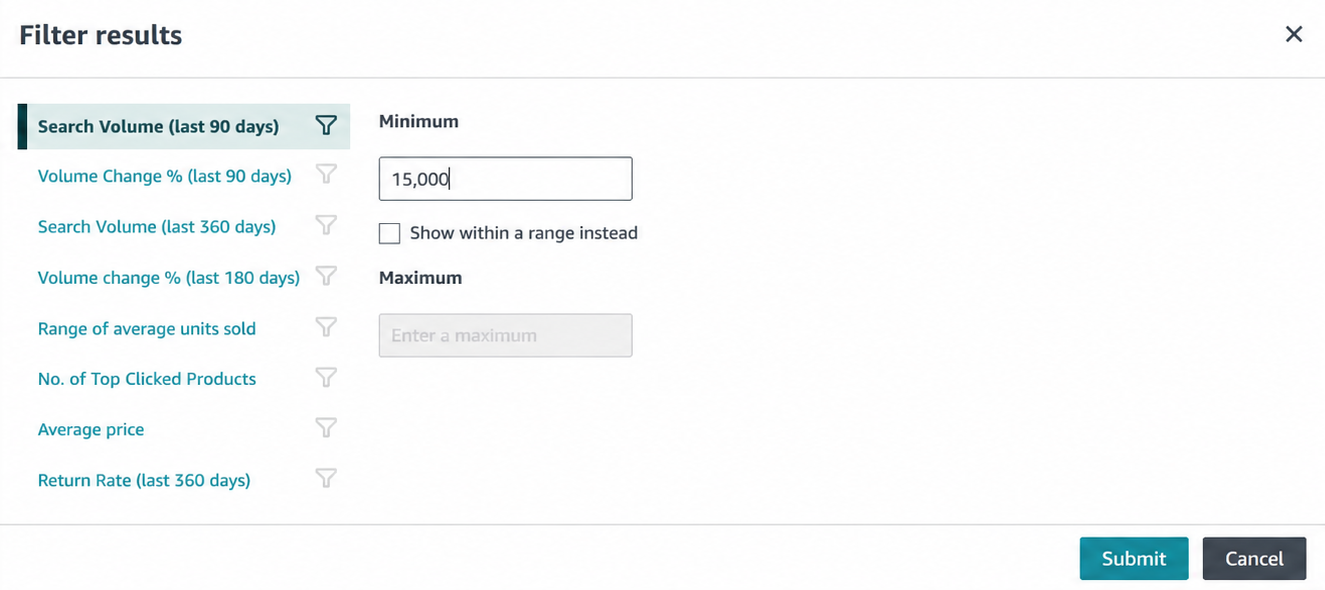
After you see matching niches, use the filter options to narrow the list. Filters help you avoid wasting time on niches that are too small, too broad, too expensive, or not aligned with your product strategy.
Useful filters can include search volume, search volume growth, product count, average price, average units sold, return rate, and number of top clicked products. The exact options may change over time, but the logic stays the same: you are looking for demand, growth, and enough room to compete.
A useful pattern is a niche with strong search volume, positive growth, and a manageable number of products. That can suggest unmet demand. However, it is still only a signal. You still need to check competition, reviews, price, FBA fit, suppliers, and profit before making a product decision.
Step 3: Open the Niche Details Page
Once a niche looks promising, open the Niche Details page. This page gives you a deeper view of the niche and shows the main metrics Amazon has grouped around that customer need.
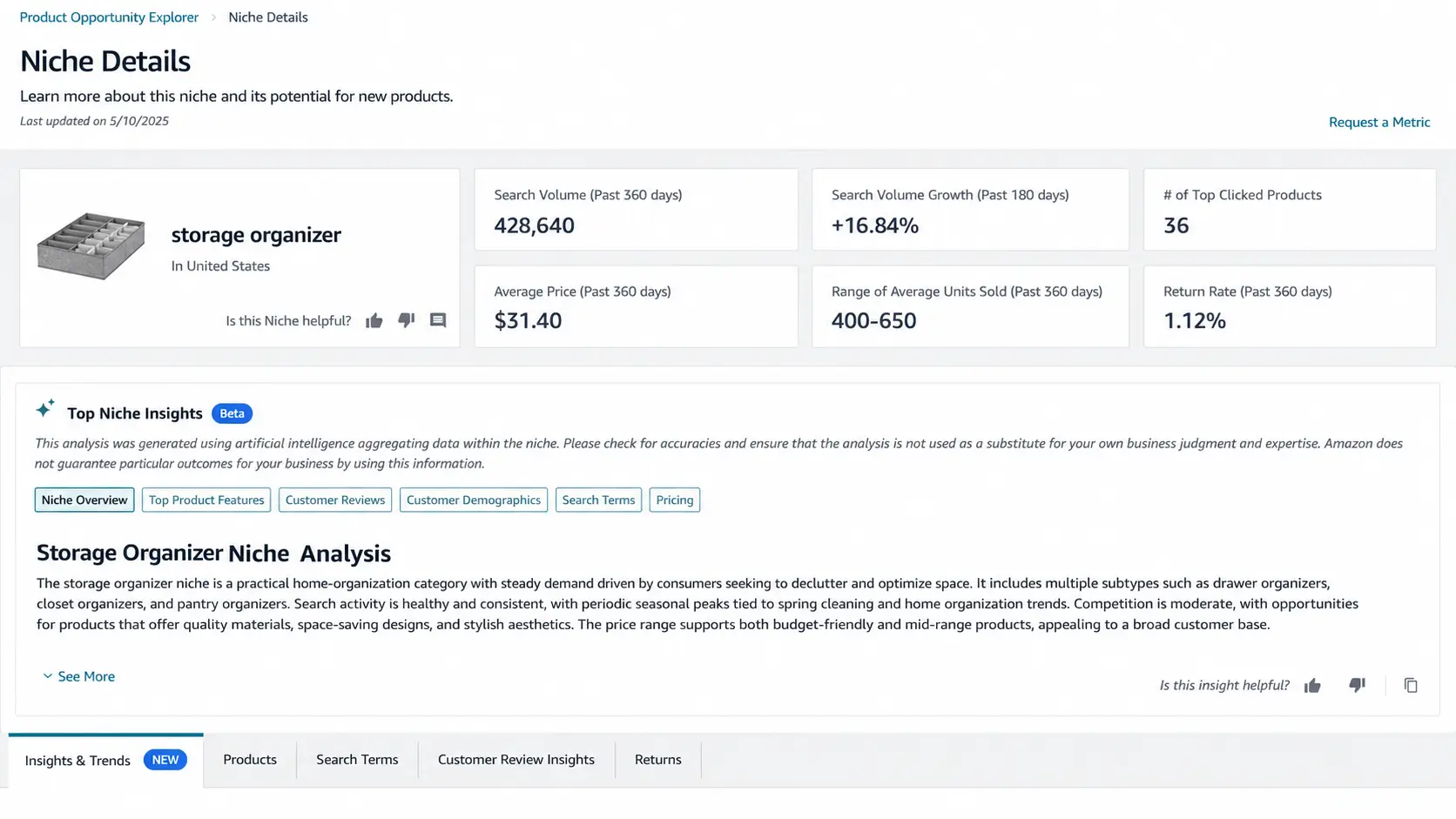
In the storage organizer example, the Niche Details page shows high-level information such as search volume, search volume growth, number of top clicked products, average price, average units sold, and return rate.
These numbers give you a first impression of the niche. Strong search volume may show demand. Growth may show momentum. Average price can help you think about margin. Return rate can hint at quality or expectation problems. But none of these metrics should be used alone.
Step 4: Read the Top Niche Insights Summary
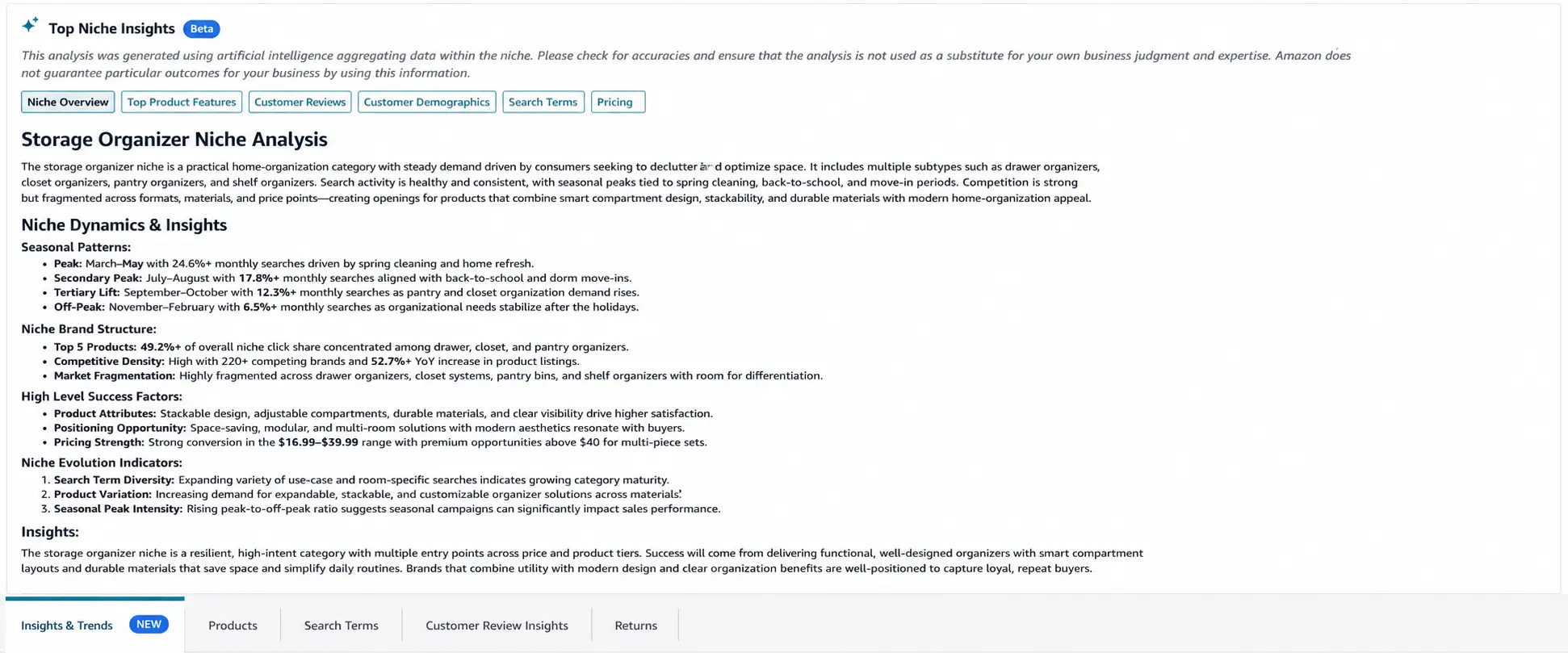
The Top Niche Insights section gives you a quick summary of important patterns inside the niche. It can help you interpret demand, competition, pricing, customer behavior, seasonal patterns, and product feature opportunities before you move into the detailed tabs.
This section is useful because it turns raw niche data into a more readable summary. For example, it may help you see whether the niche looks fragmented, whether customers are interested in several product types, whether pricing supports different product tiers, or whether there are repeated opportunities around design, material, size, use case, or customer complaints.
Use this summary as a starting point, not a final decision. Treat it like an assistant that helps you notice what to inspect next. You should still verify the idea through the Products, Search Terms, Insights & Trends, Customer Review Insights, Returns, and profitability data before making a product decision.
Step 5: Review the Products Tab
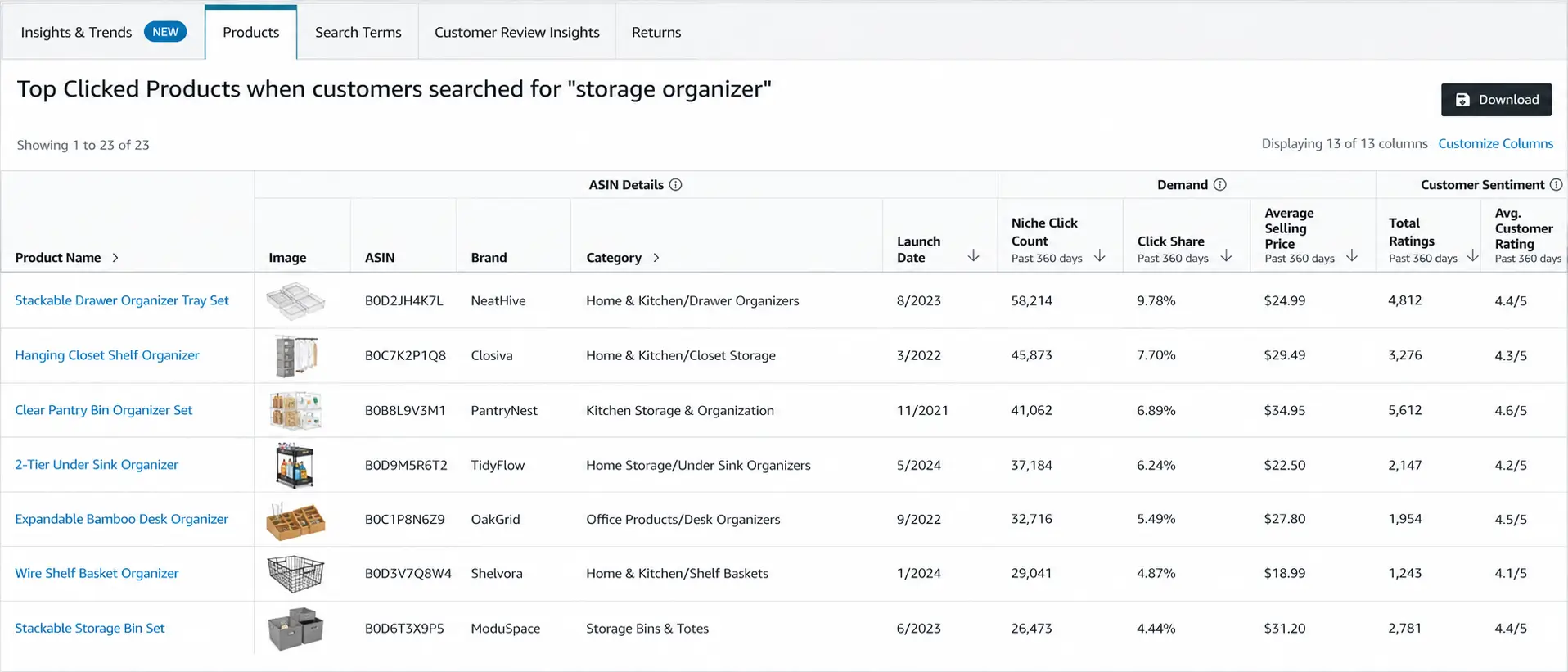
The Products tab shows the top clicked products connected to the niche. This helps you understand what shoppers are actually engaging with when they search for that type of product.
In the storage organizer example, this tab can show products such as drawer organizers, closet shelf organizers, pantry organizer sets, under-sink organizers, and storage bins. Review product names, images, brands, categories, launch dates, click share, average selling price, total ratings, and average customer rating.
This tab helps you answer important competition questions:
- Are clicks spread across several products, or does one product dominate?
- Are the top products old and established, or are newer products gaining traction?
- Are customer ratings strong, weak, or mixed?
- Are many products from the same brand?
- Do the best products cluster around a certain price range?
A good opportunity is not just a niche with demand. It is a niche where you can realistically compete with a better offer.
Step 6: Review the Search Terms Tab
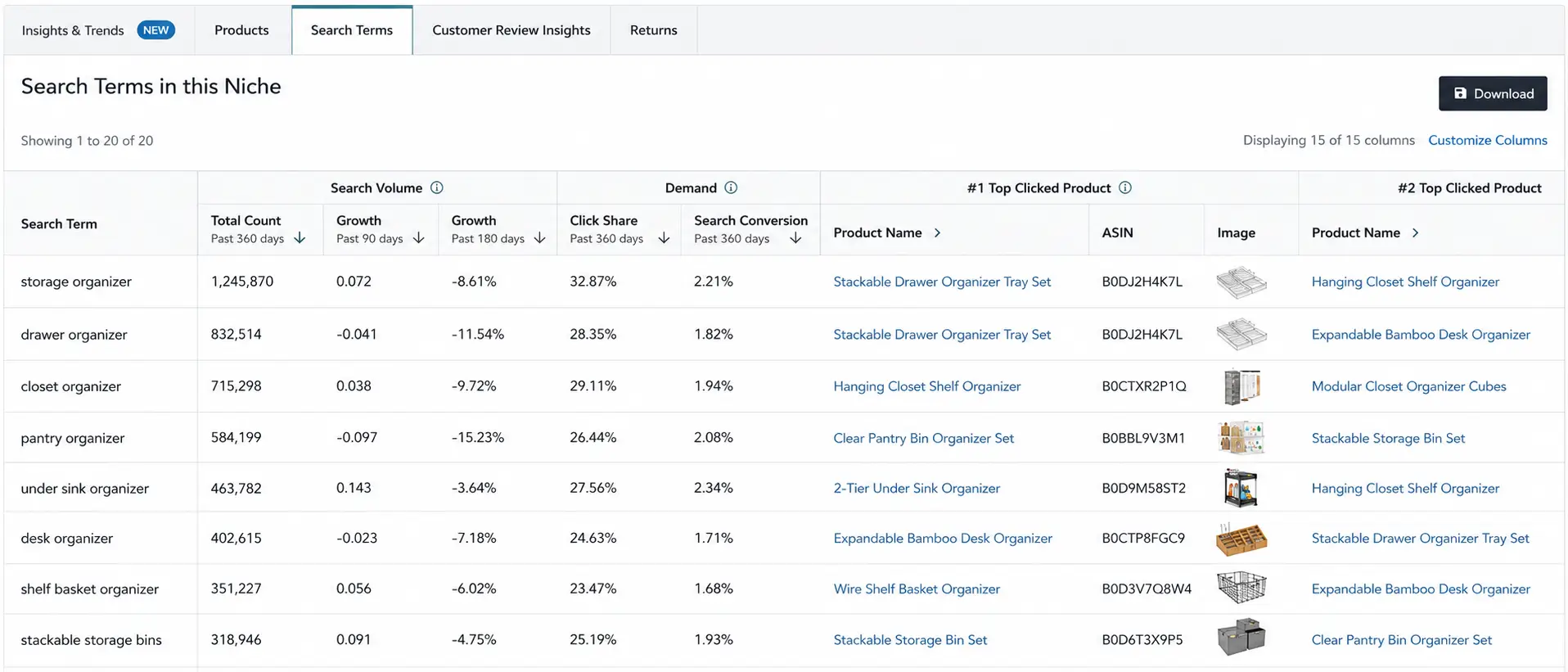
The Search Terms tab shows how shoppers search inside the niche. This is useful because a niche may contain several sub-niches or customer intents.
For example, a storage organizer niche may include terms such as storage organizer, drawer organizer, closet organizer, pantry organizer, under-sink organizer, desk organizer, shelf organizer, or stackable storage bins.
Look at search volume, growth, click share, search conversion rate, and top clicked products. High search volume can show demand, but conversion rate helps you understand whether searches are turning into product interest. A term with strong search volume but weak conversion can sometimes suggest an unmet need or a mismatch between what shoppers want and what current products offer.
This tab can also help with future listing and PPC planning because it shows the terms customers actually use inside Amazon.
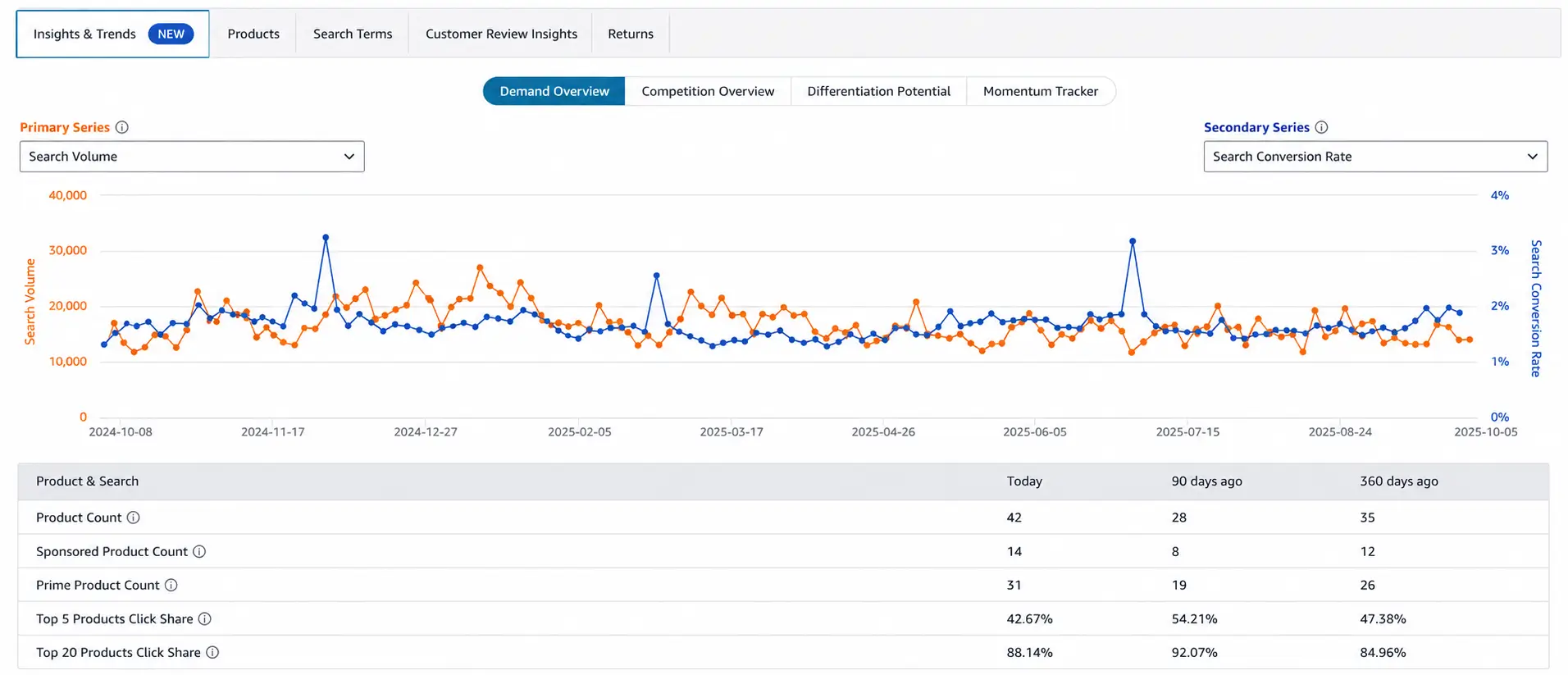
Step 7: Use Insights & Trends to Compare Demand and Competition
The Insights & Trends tab helps you understand how the niche behaves over time. This is where you can compare demand, conversion, product count, pricing, and other signals instead of looking only at a static snapshot.
For example, you can compare Search Volume with Search Conversion Rate. Search volume tells you how much interest exists. Search conversion rate helps you understand whether that interest is turning into purchase behavior.
You can also use the dropdown metrics to compare other signals such as average selling price, product count, Prime product count, sponsored product count, brand count, out-of-stock rate, or top product click share.
The exact metrics available may vary by marketplace, account access, and the current version of the tool, so focus on the logic of comparison rather than memorizing one fixed screen layout.
This is where you can start asking better questions:
- Is demand steady or seasonal?
- Is the number of products increasing?
- Are prices rising or falling?
- Is conversion stable or declining?
- Are more sponsored products entering the niche?
- Are a few products capturing most of the clicks?
Do not treat one graph as the full answer. Use trends to understand direction, then compare that direction with products, reviews, price, return signals, and profit potential.
Step 8: Use Customer Review Insights to Find Product Gaps
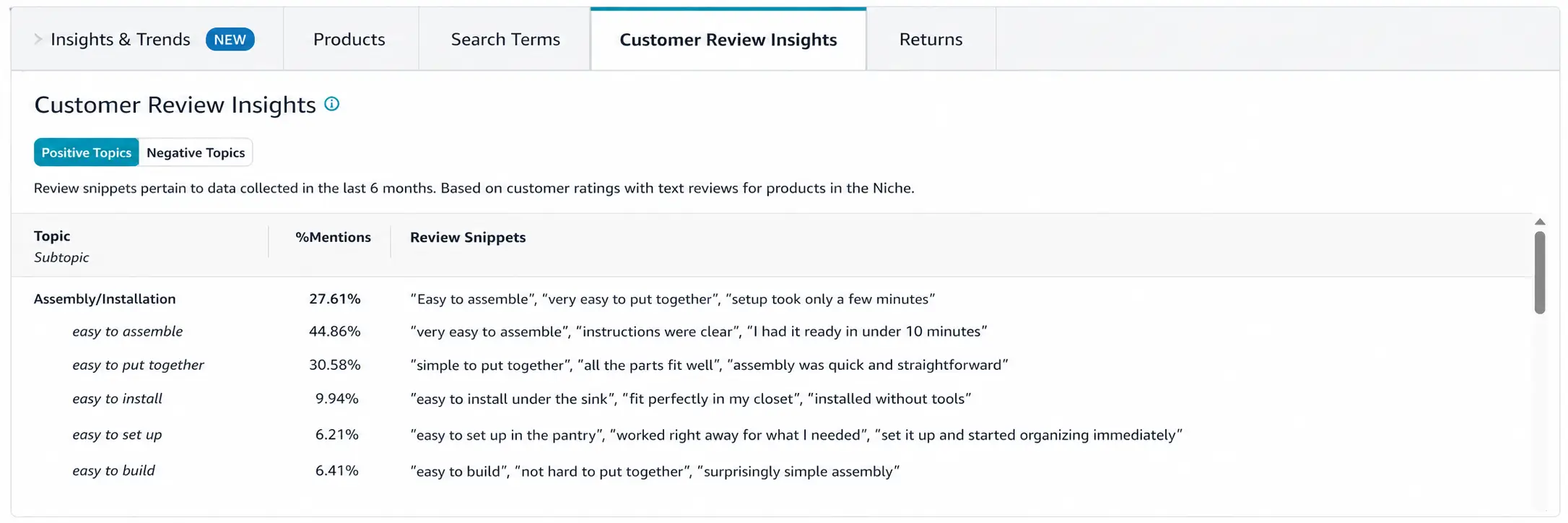
Customer Review Insights can help you understand what buyers repeatedly praise or complain about. This is one of the most useful parts of the tool for finding product improvement opportunities.
For a storage organizer niche, positive review themes might include easy assembly, sturdy design, space-saving layout, and clear visibility. Negative themes might include missing parts, flimsy materials, products being smaller than expected, weak packaging, or poor instructions.
These review patterns can help you improve your product idea before sourcing. Instead of guessing what customers want, you can use repeated review themes to guide product design, packaging, instructions, listing images, and positioning.
If several products receive attention but customers complain about the same issue, that may be a differentiation opportunity.
Step 9: Check Returns if the Tab Is Available
If the Returns tab is available, use it as another validation layer. Return data can help you understand why buyers send products back after purchase.
Common return reasons might involve quality issues, sizing problems, missing parts, damaged packaging, confusing assembly, or products not matching customer expectations. These issues can turn a promising niche into a difficult business if they are common and hard to fix.
For beginners, a niche with high return friction should be treated carefully. Even if demand looks strong, returns can reduce profit, hurt reviews, increase customer service pressure, and create inventory problems.
Use returns data together with Customer Review Insights. Reviews show what customers say publicly. Returns data can show what caused buyers to send the product back.
Step 10: Decide Whether the Niche Deserves Deeper Product Research
After reviewing the main sections, do not make a product decision immediately. Product Opportunity Explorer should help you decide whether the niche deserves deeper research, not whether you should buy inventory right away.
A niche may deserve deeper research if it shows:
- clear search demand
- positive or stable demand trends
- reasonable average price
- fragmented click share
- weaknesses in current products
- review complaints you can address
- low return risk or fixable return reasons
- room for FBA advantage
Once the niche looks promising, the next step is deeper validation. That means checking profitability, Amazon fees, supplier options, restrictions, samples, shipping, and whether you can create a better offer than existing products.
For the full validation process, read our guide on Amazon FBA product research.
Product Opportunity Explorer Metrics That Matter
Product Opportunity Explorer can show a lot of data, but beginners do not need to treat every metric with the same importance. The real goal is to understand what each metric tells you about the niche and what decision it should help you make.
Instead of asking, “Is this number good or bad?” ask a more useful question: “What does this number tell me about demand, competition, pricing, customer satisfaction, or risk?”
Search Volume and Search Growth
Search volume helps you understand how often customers are searching for terms related to the niche. Search growth helps you see whether interest is increasing, declining, or staying stable over time.
A niche with strong search volume can be interesting, but volume alone is not enough. If search volume is high but growth is falling, the niche may be cooling down. If search volume is moderate but growing steadily, the niche may deserve deeper research.
The strongest pattern is usually stable or growing demand over time. Sudden spikes can be useful, but they may also reflect a temporary trend, season, or viral moment.
Number of Products and Click Share
The number of products helps you understand how many existing products are competing inside the niche. Click share helps you understand how customer attention is distributed among those products.
If there are many products and one product or brand receives a large share of clicks, the niche may be difficult to enter. That can mean customers already strongly prefer a specific product, brand, or listing.
If click share is more fragmented, the market may be more open. A fragmented niche means customers are clicking several products instead of focusing only on one dominant listing.
Do not assume that a low product count is always good. If the number of products is low but click share is concentrated in one strong product, the market may still be hard to enter. The better signal is demand combined with room to compete.
Average Price and Average Units Sold
Average price helps you understand the price range customers are already accepting in the niche. Average units sold helps you estimate whether products are moving at a meaningful pace.
A niche with a very low average price may be harder to profit from after product cost, shipping, Amazon fees, PPC, and returns. A niche with a higher average price may give more margin room, but it can also require stronger branding, better images, and more customer trust.
Average units sold can help you see whether the niche has enough commercial activity. But just like search volume, units sold should not be used alone. You still need to check competition, reviews, pricing pressure, fees, and supplier cost.
If a niche looks promising but you are unsure whether the numbers can work, use your own cost assumptions and estimate the full margin. You can later test launch budgets with an Amazon FBA cost calculator.
Reviews and Ratings
Reviews and ratings help you understand how established the existing products are and how satisfied customers appear to be.
A niche where every top product has thousands of reviews and high ratings can be difficult for beginners. It may still be profitable for established brands, but new sellers may struggle to compete on trust.
On the other hand, a niche with products getting clicks but showing average ratings or repeated complaints may reveal improvement opportunities. That does not automatically make it a good product, but it gives you something to investigate.
Look for the story behind the ratings. If customers complain about weak materials, confusing instructions, missing parts, poor packaging, or misleading size, those issues may point to a better product angle.
Prime, Sponsored Products, and Out-of-Stock Signals
Some of the most useful signals in Product Opportunity Explorer are not just about demand. They are about execution and competition.
A low percentage of Prime products may show an opportunity for an FBA seller to offer faster and more reliable fulfillment. A high out-of-stock rate may suggest that existing sellers are not keeping up with demand. A high percentage of products using Sponsored Products may suggest stronger advertising competition.
These signals should not be read in isolation. For example, a high out-of-stock rate can suggest opportunity, but it can also mean the niche is hard to supply or forecast. A low sponsored-products percentage can suggest lower ad pressure, but you still need to check organic competition and conversion potential.
For Amazon FBA sellers, these metrics are useful because they help you think beyond the product itself. They show whether fulfillment reliability, inventory planning, or advertising competition may affect your chance of success.
Trends and Seasonality
Trends help you see whether demand is stable, growing, seasonal, or declining. This is especially important before buying inventory because the timing of your order can affect your cash flow.
If search volume peaks during certain months, you may need to prepare inventory before that demand window. If prices drop sharply during off-season periods, you may need a stronger margin buffer. If conversion rises only during a short window, the niche may be risky for a beginner.
Use trends to answer two questions: is the demand real, and when does that demand matter most? A niche can be attractive, but launching at the wrong time can still create inventory problems.
Product Opportunity Explorer Analysis and Decision Framework
After reading the metrics, the next step is Product Opportunity Explorer analysis: turning niche data into a clear decision. Amazon Product Opportunity Explorer can show many useful signals, but you still need a simple way to interpret them before deciding whether a niche deserves deeper research.
The framework below helps you separate promising signals from warning signs. Use it before deciding whether a niche deserves deeper product research.
| Signal type | What it may look like | What to do next |
|---|---|---|
| Green signals | Strong search volume, positive growth, fragmented click share, lower product count, non-branded search demand, repeated review complaints, low Prime penetration, or high out-of-stock rate. | Move the niche into deeper validation. Check products, reviews, FBA fees, supplier options, restrictions, and profit before making a decision. |
| Warning signals | One product or brand controls most clicks, very high review counts, strong branded search terms, seasonal spikes only, high sponsored-product usage, high return reasons, or tight price competition. | Be cautious. Look for a smaller sub-niche, a clearer differentiation angle, or a different product idea before spending money. |
| Mixed signals | The niche has demand, but competition, reviews, pricing, returns, or fulfillment signals are unclear. | Compare the niche with external product research tools, review customer complaints, estimate profit, and test your assumptions before contacting suppliers. |
This framework is not a guarantee. It is a practical reading map that helps you decide whether a niche deserves deeper research or should be rejected early.
The best opportunities usually do not come from one perfect metric. They come from a combination of signals. A niche with strong demand, fragmented clicks, weak review patterns, and clear product improvement opportunities may be more interesting than a niche that only has high search volume.
The opposite is also true. A niche can have strong demand but still be a bad fit if one brand dominates clicks, every top product has thousands of reviews, return reasons are serious, or the price range leaves no margin after fees and shipping.
How to Use Product Opportunity Explorer for Amazon FBA Product Research
Product Opportunity Explorer is especially useful for Amazon FBA product research because it helps you understand the niche before you spend money on samples, suppliers, packaging, or inventory.
For FBA sellers, a product idea needs more than demand. It also needs to make sense after fulfillment fees, storage, inbound shipping, returns, PPC, and inventory risk. Product Opportunity Explorer can help you decide whether a niche deserves that deeper analysis.
Here is a practical way to use the tool inside an Amazon FBA research workflow:
- Start with a broad product idea. Use Product Opportunity Explorer to see related niches and customer needs.
- Check demand and growth. Look at search volume, search volume growth, and trend patterns.
- Check competition structure. Review product count, click share, top clicked products, reviews, and ratings.
- Look for product gaps. Use Customer Review Insights, purchase drivers, returns, and product data to see where existing products are weak.
- Check FBA fit. Look for signals that suggest whether fast fulfillment, Prime availability, or out-of-stock issues could create an opportunity.
- Move to deeper validation. Use your product research process to check profit, FBA fees, suppliers, restrictions, samples, and differentiation before buying inventory.
The important point is that Product Opportunity Explorer should not be the only tool you use. It helps you understand the niche. It does not calculate your full landed cost, inspect supplier quality, check every restriction, or guarantee that customers will buy your version of the product.
For the full validation process, read our guide on Amazon FBA product research. That guide explains how to check demand, competition, reviews, profit, FBA fit, restrictions, supplier options, and differentiation before buying inventory.
You should also estimate the financial side before moving forward. A niche may look attractive in Product Opportunity Explorer, but if the product cost, shipping, Amazon FBA fees, PPC, returns, and storage leave little margin, it may still be a weak opportunity. You can use our Amazon FBA cost calculator to test launch-budget assumptions before buying inventory.
Product Opportunity Explorer vs Jungle Scout, Helium 10, and AMZScout
Many sellers compare Product Opportunity Explorer with tools such as Jungle Scout, Helium 10, and AMZScout. That comparison makes sense, but it is better to think of these tools as different layers of product research rather than direct replacements for one another.
Product Opportunity Explorer is an Amazon tool. Its main strength is helping you understand Amazon-side customer demand, niches, search terms, clicked products, reviews, trends, purchase drivers, and returns inside Seller Central.
Third-party tools such as Jungle Scout, Helium 10, and AMZScout often provide broader product databases, sales estimates, keyword tools, competitor tracking, profit calculators, product trackers, and additional workflows outside Seller Central.
In practice, the best option depends on the question you are trying to answer.
| Research need | Product Opportunity Explorer | Third-party tools |
|---|---|---|
| Amazon-side customer demand | Strong. It uses Amazon niche, search, click, and customer behavior signals. | Useful, but usually based on estimates, models, or external datasets. |
| Niche discovery | Strong for exploring customer needs and related search terms inside Amazon. | Strong when you want broader product databases and custom filters. |
| Search terms and click behavior | Useful for seeing search terms, click share, conversion, and top clicked products. | Often stronger for keyword expansion, tracking, and reverse-ASIN keyword research. |
| Product database filtering | Helpful, but more limited than many dedicated product research tools. | Often stronger for filtering by revenue, reviews, size, weight, sellers, and other criteria. |
| Competitor tracking | Helpful for understanding products inside a niche, but not a full tracking suite. | Often stronger for product tracking, sales history, keyword tracking, and competitor monitoring. |
| Customer review insights | Strong when Customer Review Insights are available inside the niche or ASIN view. | Varies by tool. Some tools provide AI review analysis or review download features. |
| Profit and fee calculations | Can provide useful market context, but should not be your only profit calculator. | Often stronger for detailed profitability estimates, FBA fee estimates, and tracking cost assumptions. |
| Best use | Understanding Amazon demand, customer needs, niche structure, and early opportunity signals. | Expanding research, estimating sales, tracking competitors, analyzing keywords, and validating profitability. |
The practical answer is not that one tool always wins. Product Opportunity Explorer can be excellent for understanding niche demand inside Amazon. Third-party tools can be useful when you need broader filtering, tracking, keyword research, competitor analysis, or profitability tools.
A smart workflow can use both. For example, you might use Product Opportunity Explorer to identify a niche with real customer demand, then use Helium 10 Black Box, Jungle Scout, AMZScout, Keepa, or another tool to validate sales estimates, competition, price history, keyword opportunity, and profitability.
If you are a beginner, do not feel forced to use every tool at once. Start by understanding the niche and the customer need. Then add other tools only when they help you answer a specific question more clearly.
Limitations of Product Opportunity Explorer
Product Opportunity Explorer is useful, but it should not be treated as a complete product decision tool. It can help you understand customer demand, search behavior, niche structure, reviews, trends, and potential gaps, but it does not guarantee that a product will sell or become profitable.
Amazon’s own guidance explains that the tool is meant to provide general information to help with selection decisions. It should not replace your own judgment, because product demand, price changes, competing offers, fees, and customer behavior can all change over time.
It may not be available to every seller account
Product Opportunity Explorer is available inside Seller Central, but access can depend on your seller account type, marketplace, and user permissions. Amazon’s help materials state that the tool is currently available to Professional sellers.
If you do not see the tool under the Growth menu, check whether you are using the correct Seller Central account, whether your account has the required access, and whether your user permissions allow access to new product opportunities.
Some searches may return no matching niches
If you enter a search term and Product Opportunity Explorer shows no matching niches, that does not always mean the product idea is bad. It may mean the search term does not have enough volume yet, or that Amazon has not grouped it into a niche inside the tool’s dataset.
Try alternate phrasing, broader keywords, related product terms, or category browsing before rejecting the idea completely.
Not every ASIN maps cleanly to a niche
Product Opportunity Explorer can also support ASIN-based research, but not every ASIN will be mapped to a niche. If you search for a product and cannot find related niche data, it may simply mean Amazon has not grouped that product into a customer-need cluster in the way you expected.
The data is helpful, but not the full profit picture
Product Opportunity Explorer can help you understand demand, search terms, product clicks, reviews, trends, and customer behavior. But it does not replace a full profitability check.
Before you buy inventory, you still need to estimate product cost, supplier shipping, Amazon referral fees, FBA fulfillment fees, storage, PPC, returns, packaging, prep, and a safety buffer. If you are still calculating launch costs, use our Amazon FBA cost calculator and review our full guide to Amazon FBA fees.
Metrics update over time
Product Opportunity Explorer data is refreshed over time. Amazon’s help materials explain that new niches can be created at the beginning of each month and that metrics are refreshed at the beginning of the week.
That means the tool is useful for current research, but you should not treat one screenshot or one data pull as permanent. Recheck important niches before making sourcing or launch decisions.
Common Mistakes When Using Product Opportunity Explorer
Product Opportunity Explorer can make product research easier, but only if you interpret the data carefully. Here are common mistakes to avoid.
Using search volume as the only decision point
High search volume can show demand, but it does not automatically mean the niche is beginner-friendly. You also need to check click share, competition, reviews, price, return risk, FBA fit, and profit potential.
Ignoring click share concentration
If one product or one brand controls a large share of clicks, the niche may be harder to enter. A more fragmented click share can sometimes suggest a more open market, but it still needs deeper validation.
Skipping Customer Review Insights
Many sellers focus on demand and forget to study customer feedback. Customer Review Insights can reveal repeated complaints, missing features, poor materials, confusing instructions, weak packaging, or sizing problems. These patterns can help you decide how to improve your offer.
Not checking Returns data
If Returns data is available, do not ignore it. A niche can look attractive but still have serious return problems. Repeated return reasons may reveal product quality issues, poor fit, misleading expectations, or packaging problems.
Assuming the tool replaces product research
Product Opportunity Explorer is part of product research, not the entire process. Use it to understand niche demand and customer behavior, then continue with competitor analysis, review mining, cost calculations, supplier checks, restriction checks, and sample testing.
Buying inventory too soon
Do not buy inventory just because a niche looks promising in Product Opportunity Explorer. Treat the tool as an early validation layer. A product idea should still pass profitability, FBA fees, supplier, restriction, sample, and differentiation checks before you commit capital.
Frequently Asked Questions
What is Amazon Product Opportunity Explorer?
Amazon Product Opportunity Explorer is a product research tool inside Seller Central that helps sellers explore customer demand, search behavior, product niches, clicked products, reviews, trends, and possible opportunities for new products or offers.
Is Amazon Product Opportunity Explorer free?
Product Opportunity Explorer is available inside Seller Central for eligible sellers. Amazon’s help materials state that the tool is currently available to Professional sellers, so it is not the same as a public free tool that anyone can use without a Seller Central account.
Where is Product Opportunity Explorer in Seller Central?
You can usually find Product Opportunity Explorer in Seller Central by opening the main menu, going to Growth, and selecting Product Opportunity Explorer. If you do not see it, check your account type, marketplace, and user permissions.
Who can use Amazon Product Opportunity Explorer?
Amazon’s help materials state that Product Opportunity Explorer is currently available to Professional sellers. Access may also depend on marketplace availability and account permissions, especially if you are not the primary user on the seller account.
Why can’t I access Product Opportunity Explorer?
You may not be able to access Product Opportunity Explorer if you are not using an eligible Professional selling account, if your marketplace does not show the tool, or if your user permissions do not include access to new product opportunities. Browser issues can also cause display problems, so clearing cookies or updating your browser may help.
How often is Product Opportunity Explorer updated?
Amazon’s help materials explain that new niches can be created at the beginning of each month and that metrics are refreshed at the beginning of the week. Because data can change, it is a good idea to recheck important niches before making inventory decisions.
Why does my search show no matching niches?
If your search shows no matching niches, the term may not have enough search volume yet, or Amazon may not have grouped it into a niche in the tool’s dataset. Try a broader keyword, a synonym, or a related phrase.
Can I search by ASIN in Product Opportunity Explorer?
Yes, Product Opportunity Explorer can support ASIN-based research. However, not every ASIN maps clearly to a niche. If a product does not appear in a niche, it may simply not be clustered into a customer-need group inside the tool.
Is Product Opportunity Explorer enough for product research?
No, it should not be your only product research step. Product Opportunity Explorer can help you understand customer demand and niche signals, but you still need to check profit, FBA fees, shipping, suppliers, restrictions, reviews, and differentiation before buying inventory.
Product Opportunity Explorer vs Jungle Scout: which is better?
Neither tool is always better for every seller. Product Opportunity Explorer is strong for Amazon-side niche, search, click, review, and trend data. Jungle Scout, Helium 10, AMZScout, and similar tools can be stronger for broader product databases, competitor tracking, keyword expansion, and profitability workflows. Many sellers use them together.
Does Product Opportunity Explorer show exact sales?
Product Opportunity Explorer provides useful demand and niche signals, but you should not treat every number as an exact prediction of your future sales. Use the data as a guide, then validate the product with fee estimates, supplier research, reviews, and your own business judgment.
Can beginners use Product Opportunity Explorer?
Beginners with the right Seller Central access can use Product Opportunity Explorer, but the data may feel overwhelming at first. Start with the main signals: search volume, growth, products, click share, reviews, trends, and return reasons. Then move into deeper analysis as you learn.
Final Thoughts
Amazon Product Opportunity Explorer is a valuable tool because it gives sellers a clearer view of customer demand inside Amazon. It can help you discover niches, understand search behavior, compare products, study reviews, track trends, and identify potential gaps in the market.
But the tool should not be treated as a shortcut to a guaranteed winning product. It is best used as an early research layer that helps you decide what deserves deeper validation.
Use it to find promising niches, then continue with full product research: estimate costs, check Amazon FBA fees, review suppliers, study restrictions, order samples, and make sure you can create a better offer than what already exists.
If you want to connect this tool to the full validation process, read our guide on Amazon FBA product research. If you are still collecting product ideas, start with our guide on how to find products to sell on Amazon.
