

In the full Amazon FBA process, product research is the step that helps you decide whether a product idea is worth real money. It is the difference between guessing and making a decision based on demand, competition, profit, fees, shipping, reviews, restrictions, and supplier options.
Many beginners think product research means finding something that looks popular. That is only the beginning. A product can look interesting, appear on Amazon Best Sellers, or show strong sales estimates and still be a bad opportunity if the margin is weak, the niche is too competitive, the product is hard to ship, or the category is restricted.
This guide explains how to do Amazon FBA product research in 2026 in a practical way. You will learn how to move from a product idea to a validation decision using Amazon data, customer reviews, product research tools, profit checks, FBA criteria, and a simple scorecard before ordering samples or inventory.
If you are still at the idea stage, start with our guide on how to find products to sell on Amazon. That guide helps you collect product ideas. This article shows you how to validate those ideas before spending money.
Quick Answer: What Is Amazon FBA Product Research?
Amazon FBA product research is the process of checking whether a product idea has enough demand, manageable competition, healthy profit potential, FBA-friendly logistics, low restriction risk, reliable supplier options, and a clear way to stand out before you buy inventory.
The goal is not to find a “perfect” product. The goal is to avoid weak ideas early and focus only on products that deserve deeper validation, samples, and possibly a controlled first order.
A strong product research process usually checks:
- demand and search interest
- sales and revenue signals
- competition and review strength
- customer complaints and product gaps
- selling price and landed cost
- Amazon FBA fees and storage risk
- shipping size and weight
- restrictions, compliance, and product risk
- supplier availability and sample quality
- differentiation potential
For beginners, product research should happen before contacting too many suppliers, paying for large inventory orders, or building a full listing. A product that fails the research stage should be rejected early, before it becomes an expensive mistake.
Amazon FBA Product Research Process at a Glance
Use this quick map to understand the Amazon FBA product research process before going deeper. The goal is to move from a product idea to a clear decision: reject it, research it more, order samples, or prepare for a controlled first launch.
| Research Stage | What You Check | Where to Go Deeper |
|---|---|---|
| 1. Product idea | Start with a product idea from Amazon search suggestions, Best Sellers, reviews, trends, competitors, or supplier catalogs. | Use the guide on how to find products to sell on Amazon. |
| 2. Demand | Check whether shoppers are searching for and buying similar products using search volume, BSR, sales signals, and niche data. | Use Amazon data, Best Sellers, and Product Opportunity Explorer. |
| 3. Competition | Review competing listings, review counts, brand strength, ad pressure, pricing, and whether new sellers can realistically enter. | Compare the first page manually and use tools such as Helium 10 Xray. |
| 4. Reviews | Study customer complaints, weak ratings, missing features, packaging problems, and repeated product gaps. | Use reviews to find a real improvement angle instead of copying existing products. |
| 5. Profit | Estimate selling price, landed cost, Amazon fees, PPC, storage, returns, shipping, and safety buffer. | Review Amazon FBA fees and test numbers with the Amazon FBA cost calculator. |
| 6. FBA fit | Check size, weight, durability, prep needs, packaging, storage risk, and whether the product is practical for FBA. | Prefer simple, lightweight, durable products for a beginner-friendly launch. |
| 7. Tools | Use product research tools to build shortlists, filter products, compare markets, and validate search result pages. | Start with Helium 10 Black Box and validate markets with the Helium 10 Chrome Extension. |
| 8. Final decision | Decide whether to reject the idea, research more, order samples, or prepare for a controlled first inventory order. | Use the product research scorecard before spending money on samples or inventory. |
Product Ideas vs Amazon FBA Product Research
A product idea is not the same thing as a validated product.
A product idea can come from Amazon search suggestions, Best Sellers, customer reviews, social media, Google Trends, Product Opportunity Explorer, supplier catalogs, or competitor listings. At that stage, the idea is only a possibility.
Product research is what happens next. It is the process of checking whether that idea can survive the real conditions of Amazon FBA: demand, competition, fees, shipping, PPC, inventory risk, restrictions, and customer expectations.
For example, “coffee mug with lid” may be a product idea. Product research asks better questions:
- Are people consistently searching for this type of product?
- Are the top listings dominated by strong brands?
- Do customers complain about leaks, size, heat retention, or poor materials?
- Can the product sell at a price that leaves margin after Amazon fees?
- Is it easy to ship, store, and fulfill through FBA?
- Can you source it from reliable suppliers?
- Can your version improve the offer in a visible way?
This is why product research sits between product discovery and sourcing. First you find ideas. Then you validate them. Only after that should you think seriously about samples, suppliers, packaging, and inventory.
Why Product Research Matters Before Buying Inventory
Amazon FBA is an inventory-based business model. Once you buy inventory, your money is tied to that product. If the product does not sell, sells too slowly, gets returned often, or becomes expensive to store, the mistake can hurt your cash flow quickly.
Good product research helps you reduce that risk before you spend money. It helps you avoid products that are popular but unprofitable, niches that look attractive but are controlled by major brands, products that are difficult to fulfill, and ideas that depend on perfect conditions to work.
Product research also connects directly to other parts of the Amazon FBA journey:
- Your startup budget depends on product cost, shipping, samples, and launch plan.
- Your profit depends on Amazon fees, PPC, returns, and storage risk.
- Your supplier search depends on whether the product can be sourced reliably.
- Your listing strategy depends on customer expectations and review gaps.
- Your launch plan depends on how competitive the niche is.
Before you commit money, it helps to understand your launch budget. You can use our Amazon FBA cost calculator to estimate inventory, shipping, PPC, tools, and safety buffer before buying inventory. For a deeper budget breakdown, read our guide on how much it costs to start Amazon FBA.
What Makes a Good Amazon FBA Product?
A good Amazon FBA product is not simply a product with sales. It should be a product that can sell, leave enough margin, survive fees and shipping, and give you a realistic chance to compete.
Steady Demand
Demand means people are already searching for and buying products in the niche. You can check demand through search volume, Amazon Best Sellers, Best Sellers Rank, Product Opportunity Explorer, Xray, sales estimates, and competitor performance.
One strong listing is not enough. A healthier market usually has several products generating sales, not one dominant seller taking all the demand.
Manageable Competition
Competition tells you how hard it may be to enter the market. Look at review counts, brand strength, listing quality, number of sellers, sponsored ads, pricing pressure, and whether Amazon or major brands dominate the page.
A beginner-friendly market often has demand but also visible weaknesses: weaker photos, unclear listings, repeated complaints, average reviews, or missing accessories.
Healthy Profit Potential
A product should leave enough margin after product cost, supplier shipping, packaging, prep, Amazon referral fees, FBA fulfillment fees, storage, PPC, returns, and unexpected costs.
Do not judge profit by selling price minus supplier price. That number ignores too many real costs. For a deeper explanation of Amazon fee layers, read our guide to Amazon FBA fees.
FBA Fit
A good FBA product should be practical to store, ship, prep, and fulfill. Small, lightweight, durable products are usually easier for beginners than oversized, fragile, heavy, or complex products.
FBA fit matters because size, weight, storage, returns, and fulfillment fees can change the economics of the product.
Low Restriction Risk
Some products and categories require approval, safety documents, compliance checks, or brand authorization. Products involving batteries, chemicals, supplements, cosmetics, children’s items, medical claims, or protected brands can be more complicated for beginners.
Before buying inventory, check whether the product is restricted, gated, hazmat-related, or exposed to IP/trademark risk.
Supplier Availability
A product is safer when you can find more than one reliable supplier, order samples, compare quality, and understand minimum order quantities before committing. Supplier availability matters because even a strong product idea can fail if the supplier is unreliable.
Differentiation Potential
Differentiation means your version of the product has a reason to exist. It could be better packaging, clearer instructions, stronger materials, a useful accessory, better images, improved sizing, a bundle, or a solution to repeated customer complaints.
You do not need to reinvent the product. But you should avoid entering the market with a copy of what already exists.
Amazon FBA Product Research Criteria
The criteria below give you a practical way to evaluate product ideas before buying samples or inventory. These are planning filters, not universal rules. A product can still require deeper validation even if it looks strong at first.
| Criteria | What to check | Why it matters |
|---|---|---|
| Demand | Search volume, BSR, sales estimates, Product Opportunity Explorer, and sales trends. | Confirms that shoppers are already interested in the type of product. |
| Competition | Review counts, seller count, brand dominance, listing quality, and ad pressure. | Shows whether a new seller can realistically enter the market. |
| Reviews | Ratings, negative reviews, repeated complaints, and review velocity. | Reveals customer pain points and possible improvement angles. |
| Profitability | Selling price, landed cost, Amazon fees, PPC, storage, returns, and buffer. | Protects you from products that sell but do not leave profit. |
| FBA fit | Size, weight, packaging, prep requirements, durability, and storage risk. | Helps you avoid products that become expensive or difficult inside FBA. |
| Seasonality | Google Trends, sales history, BSR history, and niche trend data. | Prevents you from over-ordering products that only sell in short windows. |
| Restrictions | Category approval, hazmat, safety documents, brand authorization, and IP risk. | Helps avoid products you cannot list or send to FBA. |
| Supplier availability | MOQ, sample access, supplier history, lead time, quality, and communication. | Reduces sourcing risk before you commit to inventory. |
| Differentiation | Product gaps, weak listings, poor packaging, missing features, or repeated complaints. | Gives your offer a reason to compete. |
A product idea does not need to pass every check perfectly, but if it fails several major criteria, it is usually better to move on before spending money.
Amazon FBA Product Research Scorecard
Use this scorecard to evaluate a product idea before ordering samples or inventory. Give each factor a score from 1 to 5, then calculate the total score.
Amazon FBA Product Research Scorecard
Score your product idea across demand, competition, profit, FBA fit, risk, suppliers, and differentiation before spending money.
Complete the scorecard to see whether this product idea deserves deeper research.
This scorecard does not guarantee success. It is a planning tool that helps you decide whether a product idea deserves deeper validation before you spend money on samples or inventory.
How to Do Amazon FBA Product Research Step by Step
Once you understand the criteria, you can move through the research process in a practical order. The steps below help you move from idea to decision without relying on one signal alone.
Step 1: Start With a Product Idea
Product research starts with a product idea, but the idea does not need to be perfect yet. It may come from Amazon Best Sellers, customer reviews, search suggestions, Product Opportunity Explorer, supplier catalogs, competitor listings, or your own market observations.
The important point is that the idea is only a starting point. Do not contact suppliers or buy inventory just because a product looks interesting. First, write down the product idea, the target customer, the problem it solves, and why you think the market may want it.
If you are still trying to generate ideas, read our guide on how to find products to sell on Amazon. That article covers the idea-generation stage. This section focuses on what to do after you already have a product idea worth checking.
Step 2: Check Demand
The first research question is simple: are people already searching for and buying this type of product?
You can check demand using several signals. Amazon Best Sellers and Best Sellers Rank can show whether similar products are moving. Product Opportunity Explorer can show niche-level customer search and purchase behavior. Product research tools can estimate sales, revenue, and search volume.
Do not rely on one demand signal only. A product may have strong search volume but weak conversion, or it may sell well during one season and slow down for the rest of the year. The safest approach is to compare several signals before moving forward.
Step 3: Validate the Niche With Amazon Product Opportunity Explorer
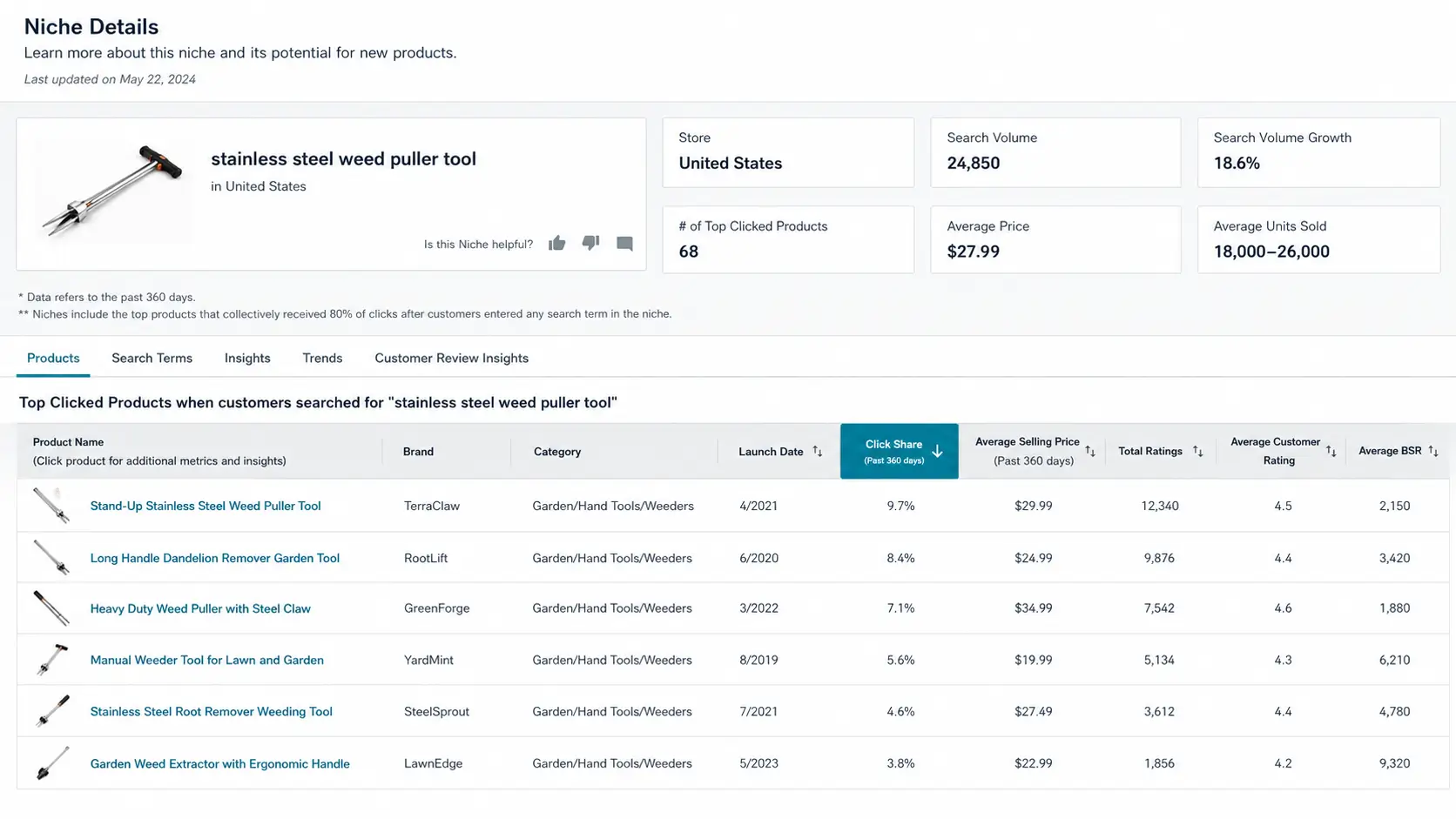
Amazon Product Opportunity Explorer can be useful because it gives you Amazon-side demand data. Instead of looking only at one product, you can study a niche, which Amazon defines around related customer search terms and products that represent a specific customer need.
Inside Product Opportunity Explorer, look for signals such as search volume, search growth, average price, average units sold, top clicked products, customer reviews, click share, and trends. These can help you understand whether the niche has demand, whether the demand is growing, and whether a few products or brands dominate the space.
A helpful pattern is high search volume with a lower number of products or weak customer satisfaction. That can suggest unmet demand. However, this is only a starting signal. You still need to check profit, FBA fees, reviews, suppliers, and restrictions before making a decision.
For a deeper walkthrough of the tool itself, read our full guide on Amazon Product Opportunity Explorer, where we explain how to access it in Seller Central, read niche data, compare search terms, review products, analyze trends, and use the data before moving into deeper product validation.
Step 4: Build a Shortlist With Black Box or Similar Tools
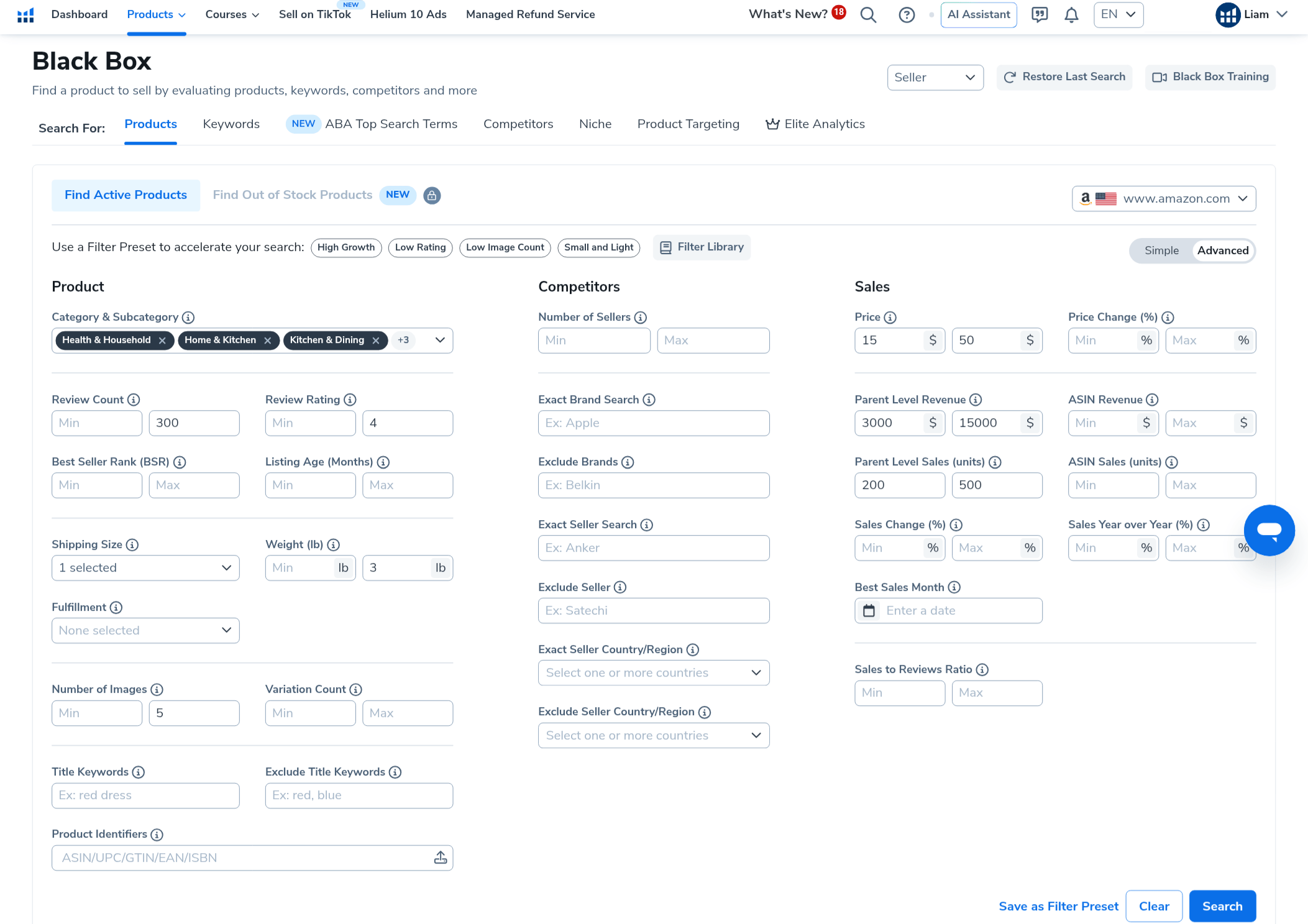
Tools like Helium 10 Black Box, Jungle Scout, AMZScout, and other product databases can help you build an initial shortlist faster than browsing Amazon manually.
For example, Helium 10 Black Box lets sellers search by product filters such as category, price, monthly sales, monthly revenue, review count, review rating, weight, size, number of images, and other criteria. The goal is not to pick a product immediately. The goal is to find candidates that deserve deeper validation.
For a practical walkthrough of the tool, read our full guide on how to use Helium 10 Black Box for Amazon product research, where we explain the Products tab, beginner-friendly filters, Monthly Sales, and how to build a shortlist without treating the tool as a final decision-maker.
A beginner-friendly starting filter might focus on products with enough monthly sales to show demand, a price range that leaves room for profit, review counts that do not make the niche impossible, and size or weight that still makes sense for FBA.
You can also look for under-optimized listings. If a product sells well but has only a few images, weak content, poor packaging complaints, or unclear positioning, there may be room to create a better offer. This does not guarantee success, but it can reveal where competitors are leaving value on the table.
Step 5: Validate the Market With Xray or Similar Tools
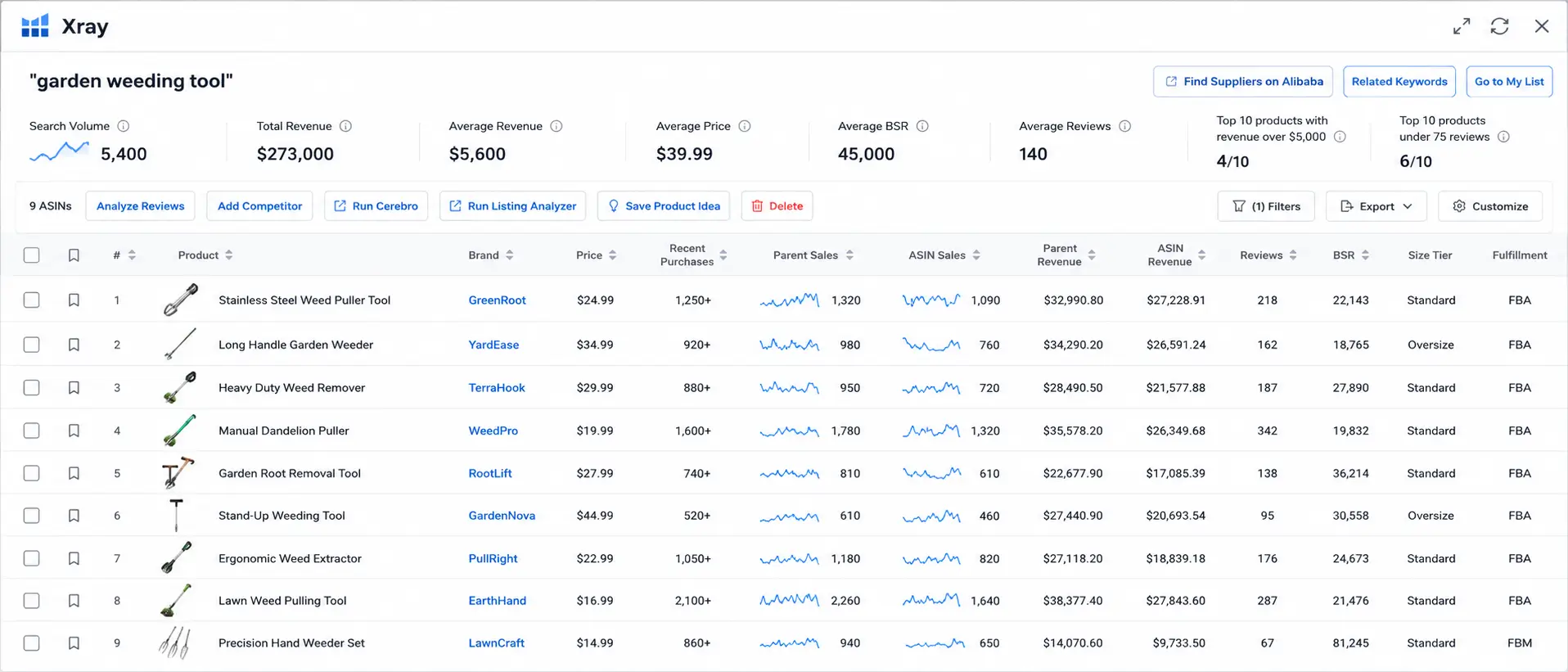
After you build a shortlist, the next step is to validate the market directly on Amazon. This is where tools like Helium 10 Xray can help.
Run a search on Amazon for the main keyword related to your product idea, then review market-level data. Useful signals include total revenue, average revenue, average price, average BSR, average review count, monthly sales, active sellers, FBA fees, size tier, and sales history.
Look for market spread. A healthier opportunity usually has several listings making sales, not one dominant product taking most of the demand. Also watch review counts. If every top listing has thousands of reviews, the market may be difficult for a beginner even if demand is strong.
Some tools show a success score or opportunity score. Treat that score as a signal, not a final decision. A niche may show strong revenue, but if most top products already have high review counts and strong brands, it may still be hard to enter.
Step 6: Study Reviews and Customer Behavior
Reviews are one of the best ways to understand what customers actually experience after buying a product. Strong product research does not only look at ratings. It looks for repeated patterns in customer feedback.
Read negative reviews, but also read 2-star and 3-star reviews. These often show useful problems without being purely emotional. Look for repeated complaints about quality, size, packaging, durability, missing parts, unclear instructions, or expectations that were not met.
Repeated complaints can become differentiation ideas. If many customers say a product leaks, breaks, arrives poorly packaged, or is smaller than expected, your version may be able to improve the product, the listing, the images, the packaging, or the bundle.
This is where product research becomes more than data. The numbers tell you whether there may be a market. Reviews tell you what customers want improved.
Step 7: Estimate Profitability Before Contacting Suppliers Seriously
A product should not move forward unless the numbers can work. Estimate the full profit picture before spending too much time with suppliers.
Start with the expected selling price. Then estimate product cost, shipping, packaging, prep, inspection, Amazon referral fees, FBA fulfillment fees, storage, PPC, returns, and a safety buffer.
If the margin only looks good before Amazon fees or PPC are included, the product is probably too fragile. A beginner product should have enough room for normal mistakes, advertising tests, returns, and shipping changes.
You can use our Amazon FBA cost calculator to test startup budget scenarios before buying inventory. You should also review our guide to Amazon FBA fees so you understand referral fees, fulfillment fees, storage fees, inbound placement costs, and other fee layers.
Step 8: Check FBA Fit, Size, Weight, and Shipping
Amazon FBA product research must include fulfillment reality. A product can have demand and still be a weak FBA product if it is heavy, fragile, oversized, difficult to package, or expensive to ship.
Check size tier, shipping weight, packaging needs, durability, storage risk, return risk, and whether the product may require special prep. Smaller and lighter products are usually easier for beginners because they reduce shipping, storage, and fulfillment pressure.
This does not mean every small product is good. It means logistics should be part of the research decision, not something you think about after ordering inventory.
Step 9: Check Restrictions and Compliance
Before moving forward, check whether the product or category is restricted, gated, compliance-heavy, hazmat-related, or exposed to intellectual property risk.
Some categories may require approval. Some products may need safety documents, brand authorization, testing, or special handling. Others may be risky because of trademarks, patents, medical claims, batteries, chemicals, or children’s safety rules.
A product is not a good opportunity if you cannot list it, advertise it, ship it safely, or send it to FBA without delays. Restrictions should be checked before you buy samples or inventory.
Step 10: Compare Supplier Options
Once a product passes the first research checks, look at supplier availability. You do not need to contact every supplier immediately, but you should confirm that the product can be sourced realistically.
Look for multiple supplier options, reasonable minimum order quantities, sample availability, clear communication, production experience, and the ability to meet packaging or labeling needs.
Do not choose a product that depends on one unreliable supplier or one unusually low quote. Supplier quality can affect reviews, returns, launch timing, and long-term margin.
We will cover supplier research in more detail in a separate Amazon FBA suppliers guide. For now, treat supplier availability as one of the final filters before ordering samples.
Step 11: Decide Whether to Order Samples
The product research process should end with a decision. Do not keep researching forever, but do not order inventory too early either.
If the product shows demand, manageable competition, healthy margin potential, FBA fit, low restriction risk, supplier options, and clear differentiation, the next step may be ordering samples from two or more suppliers.
If the product fails several major checks, reject it or return it to your idea list for later. Good product research is not only about finding winners. It is also about rejecting weak ideas before they cost you money.
Amazon FBA Product Research Tools: Free and Paid Options
Amazon FBA product research tools can help you collect data faster, compare niches, estimate sales, analyze reviews, check keywords, and evaluate profitability. Some methods are free, while paid tools can speed up the process once you understand what you are looking for.
The important point is that tools should support your product research process, not replace it. A tool can help you find signals, but you still need to check demand, competition, profit, FBA fees, shipping, restrictions, suppliers, and differentiation before buying inventory.
Free Amazon FBA Product Research Tools and Manual Methods
You can start Amazon FBA product research without paid tools. Free product research tools and manual methods include Amazon Best Sellers, Amazon search suggestions, product reviews, Google Trends, competitor listings, Best Sellers Rank, and Product Opportunity Explorer if you have access through Seller Central.
Free research is slower, but it can teach you how markets work before you pay for software. The main limitation is that free methods usually do not estimate sales, revenue, or competition as quickly as paid tools.
Paid Tools That Can Speed Up Research
Paid tools such as Helium 10, Jungle Scout, AMZScout, Seller Assistant, Keepa, and others can help with product discovery, sales estimates, review analysis, keyword research, profitability estimates, and competitor checks.
For example, Helium 10 Black Box can help you filter product ideas by category, price, sales, revenue, reviews, size, weight, and listing signals. Xray can then help you validate a market directly on Amazon using revenue, price, reviews, BSR, sales, and other metrics.
Use tools to build a shortlist and collect data. Do not use them as the final judge. The final decision should still include margin, suppliers, restrictions, FBA fit, and customer expectations.
Which Black Box Tab Should You Use?
Different Black Box tabs can help answer different research questions. You do not need to use every tab at once. Start with the one that matches your current goal.
| Research question | Better starting point |
|---|---|
| I want broad product ideas based on price, reviews, sales, size, and category. | Products tab |
| I want product ideas based on what shoppers search for. | Keywords tab |
| I want to study competitors for a known product or ASIN. | Competitors tab |
| I want to analyze a specific search term or niche. | Niche tab |
| I want accessory ideas or advertising targeting ideas. | Product Targeting tab |
How to Interpret Xray Success Score Without Overtrusting It
Some tools give you a success score, opportunity score, or quick market rating. These can be useful shortcuts, but they should never replace your own analysis.
For example, Xray’s success score can help you see how many of the top products meet certain revenue and review criteria. That can be useful, but it does not tell the whole story. A market can have strong revenue and still be difficult if most top products already have hundreds or thousands of reviews.
Use the score as a signal, then check the details. Look at demand, competition, reviews, price, FBA fees, shipping, brand strength, and whether you can create a better offer. Then use your scorecard to decide if the idea deserves more research.
Amazon FBA Product Research Checklist
Before ordering samples or inventory, run through this checklist:
- Demand is clear across more than one signal.
- The niche is not completely dominated by strong brands.
- Review counts leave room for a new seller.
- Customer reviews reveal possible improvement angles.
- The selling price can support product cost, fees, PPC, and returns.
- The product is small, durable, and realistic for FBA.
- Shipping and storage costs do not destroy the margin.
- The product is not heavily restricted or compliance-heavy.
- Multiple suppliers can provide samples.
- The product has a clear differentiation angle.
- You completed the product research scorecard.
- You have a realistic sample and testing plan.
If you cannot check most of these boxes, the product probably needs more research before you spend money.
Common Amazon FBA Product Research Mistakes Beginners Should Avoid
Choosing Based on Personal Taste
Personal interest can help you understand a market, but it should not be the only reason you choose a product. Demand, competition, margin, and risk matter more than personal preference.
Relying on One Tool Score
A high score inside a tool does not guarantee success. Scores depend on assumptions and settings. Always check the underlying data before making a decision.
Copying Best Sellers Blindly
Best Sellers prove demand, but they can also prove competition. A top product may be too competitive, too branded, or too low-margin for a beginner.
Ignoring Amazon Fees and Shipping
Fees and shipping can turn a good-looking product into a weak opportunity. Always include referral fees, FBA fees, storage, shipping, PPC, and returns before judging profit.
Skipping Review Analysis
Reviews show what customers actually experience. If you skip reviews, you may miss quality problems, expectation gaps, or the best differentiation opportunities.
Not Checking Restrictions
Some products require approval, compliance documents, or brand authorization. If you discover this after buying inventory, your launch can be delayed or blocked.
Ordering Inventory Too Early
Do not rush into inventory because the first numbers look good. Order samples first, test quality, calculate total costs, and validate the opportunity before committing your launch budget.
Frequently Asked Questions
What is Amazon FBA product research?
Amazon FBA product research is the process of checking whether a product idea has demand, manageable competition, healthy profit potential, FBA-friendly logistics, low restriction risk, supplier options, and a clear way to stand out before buying inventory.
How do you do product research for Amazon FBA?
Start with a product idea, check demand, analyze competition, study reviews, estimate profit, check FBA fees and shipping, review restrictions, compare supplier options, and decide whether the product deserves samples or should be rejected.
What should you check before choosing an Amazon FBA product?
Before choosing an Amazon FBA product, check demand, competition, reviews, landed cost, Amazon fees, PPC needs, storage risk, shipping cost, restrictions, supplier availability, and differentiation potential.
How do you know if an Amazon FBA product is profitable?
A product may be profitable if the selling price still leaves healthy margin after product cost, shipping, Amazon fees, PPC, returns, storage, and a safety buffer. You should calculate the full cost picture before ordering inventory.
Do you need paid tools for Amazon FBA product research?
No, paid tools are not required to start learning product research, but they can save time. Free methods can help you collect ideas and understand demand. Paid tools can help estimate sales, reviews, competition, keywords, and profit faster.
What is the best product research tool for Amazon FBA?
There is no single best product research tool for every seller. Helium 10, Jungle Scout, AMZScout, Seller Assistant, Keepa, and Product Opportunity Explorer can all help with different parts of the process. The best tool depends on your budget, selling model, and research style.
Can you do Amazon FBA product research for free?
Yes, you can begin for free using Amazon Best Sellers, Amazon search suggestions, customer reviews, Google Trends, competitor listings, and Product Opportunity Explorer if you have Seller Central access. Paid tools can speed up the process, but they are not the only way to start.
How long should Amazon FBA product research take?
There is no fixed timeline, but beginners should not rush. Product research may take days or weeks depending on how many ideas you compare, how deeply you validate demand and profit, and how long it takes to review suppliers and samples.
What is a good Amazon FBA product for beginners?
A good beginner product is usually simple, small, lightweight, durable, not heavily restricted, not dominated by major brands, and able to leave enough margin after product cost, shipping, Amazon fees, PPC, and returns.
When should you order samples?
Order samples only after the product passes your basic research checks. You should understand demand, competition, margin, FBA fit, restrictions, and supplier options before paying for samples.
Final Thoughts
Amazon FBA product research is not about finding a magic product. It is about building a process that helps you avoid weak ideas and focus on products with real potential.
Use Amazon data, customer reviews, tools, profit checks, supplier research, and your scorecard together. No single metric should decide the product for you.
The best product ideas usually pass several filters at once: real demand, manageable competition, healthy margin, FBA fit, low restriction risk, supplier options, and a clear way to improve the offer.
Once a product passes your research process, order samples, test quality, confirm costs, and move forward carefully. The goal is not to launch fast. The goal is to launch with fewer blind spots.
