

Helium 10 Black Box can be useful for Amazon product research, but only if you use it the right way.
The mistake many beginners make is treating Black Box like a magic product finder. They enter a few filters, see products with sales and revenue, and assume they have found something worth ordering. That is risky.
A better way to think about Black Box is this: it helps you filter the market and build a shortlist of product ideas. It does not prove that a product is worth selling.
In this guide, you will learn what Helium 10 Black Box is, which tab to start with, how to use the main filters, how to read Monthly Sales, and what to do after you find a product idea. This article fits into the broader Amazon FBA product research process, where discovery is only the first step.
What Is Helium 10 Black Box?
Helium 10 Black Box is a product research tool inside Helium 10. It helps Amazon sellers search for product ideas using filters such as category, price, monthly sales, revenue, reviews, ratings, product size, fulfillment type, and seller competition.
The easiest way to understand it is to think of Black Box as a product idea filter. Instead of scrolling through Amazon manually, you set criteria and let the tool return products that match those conditions.
For example, you might search for products in a specific category with steady monthly sales, a reasonable price range, fewer reviews, and a manageable size. Black Box can help you surface those ideas faster than manual research.
But Black Box should not be the final decision-maker. It can show you products that deserve a closer look. It cannot tell you by itself whether the product is profitable, easy to source, safe from legal issues, or realistic for your budget.
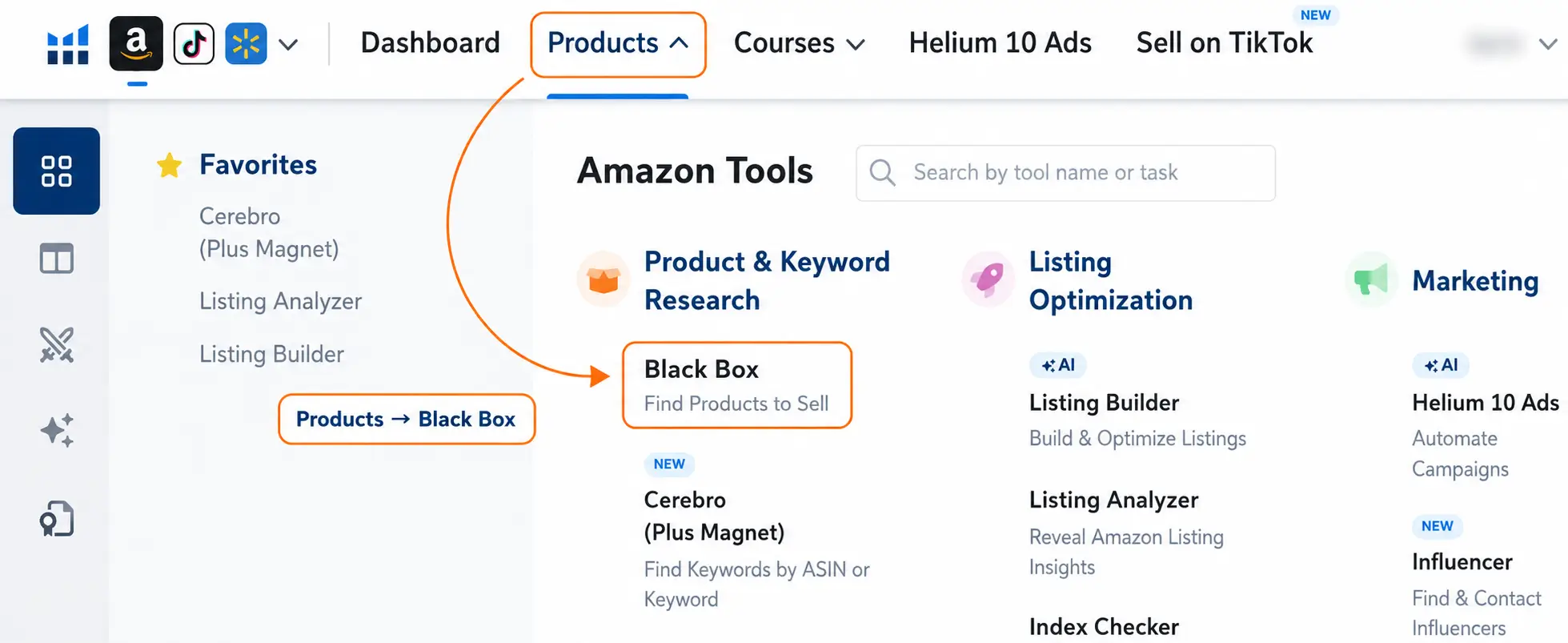
Helium 10 Black Box at a Glance
Use this quick overview before going deeper into the tutorial. Helium 10 Black Box is best used to find and filter Amazon product ideas, then those ideas should be validated with live Amazon search results, reviews, fees, suppliers, and profitability checks.
| Question | Quick Answer | Why It Matters |
|---|---|---|
| What is it? | Helium 10 Black Box is an Amazon product research tool for finding product ideas using filters. | It helps you search by category, price, sales, revenue, reviews, ratings, size, and competition signals. |
| Best use | Use it to build a shortlist of product ideas, not to choose a final product immediately. | Black Box is strongest at discovery. Product validation still needs deeper checks. |
| Best tab for beginners | The Products tab is usually the best starting point for beginners. | It gives a direct way to filter Amazon products by demand, price, reviews, size, and other criteria. |
| Important filters | Category, price, monthly sales, monthly revenue, review count, rating, size, weight, and number of sellers. | These filters help remove weak ideas and surface products worth checking more carefully. |
| What it cannot prove | It cannot prove profit, supplier quality, restrictions, legal risk, or whether your version can compete. | That is why Black Box should be followed by full Amazon FBA product research. |
| Next validation step | Open the idea on Amazon and validate it with live search results, Xray, reviews, fees, and supplier checks. | Use the Helium 10 Chrome Extension after Black Box to analyze the real search results. |
Where Helium 10 Black Box Fits in Amazon Product Research
Helium 10 Black Box is best used near the beginning of your Amazon product research process. It helps you discover and filter product ideas, but it does not validate them completely or prove that a product is worth buying inventory for.
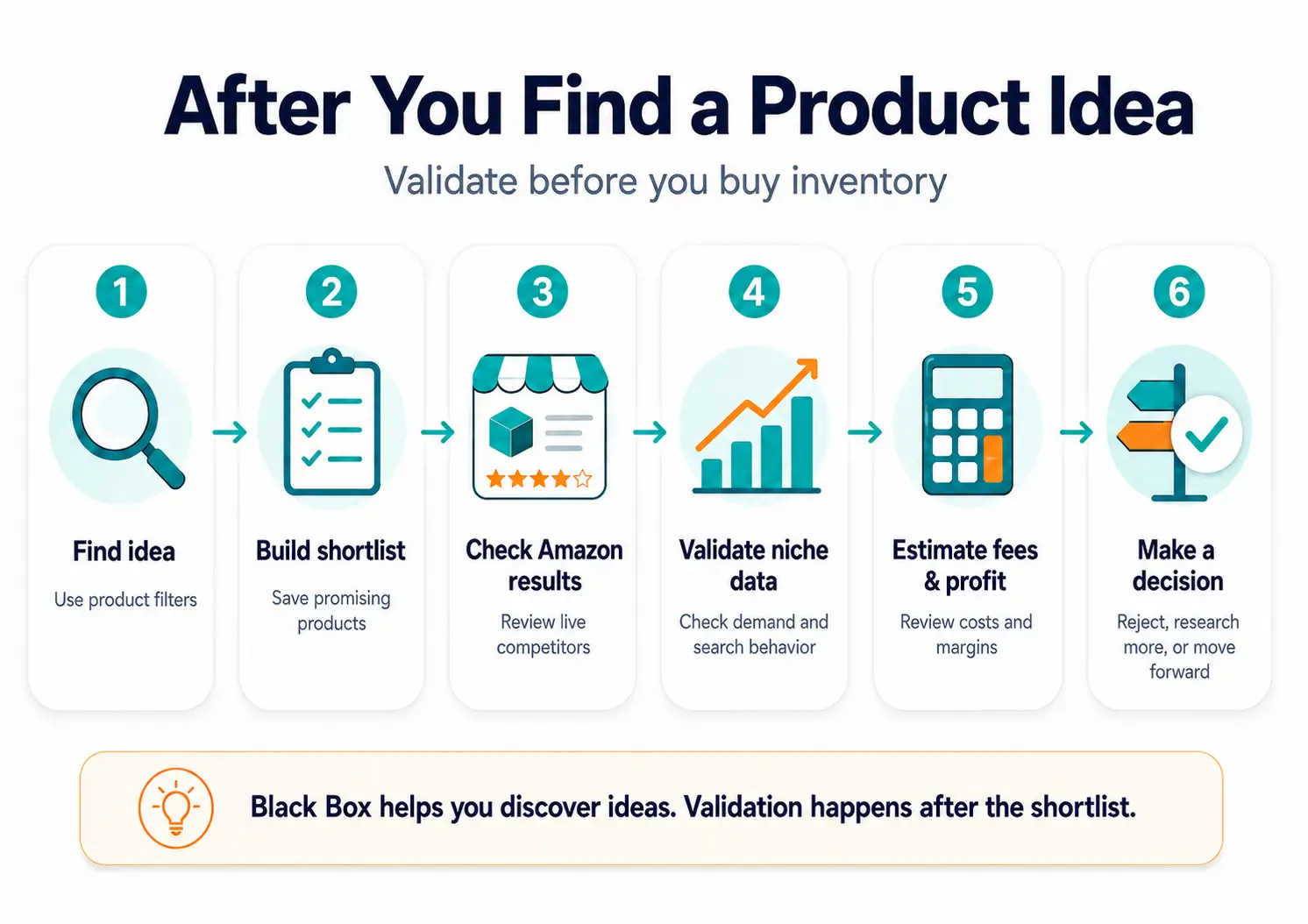
A simple workflow looks like this:
- Use Black Box to find product ideas that match your criteria.
- Save promising ideas to a shortlist.
- Open the products on Amazon and review the live search results.
- Use Xray or another product analysis tool to check the actual competitive landscape.
- Use Amazon Product Opportunity Explorer to understand niche and search-term behavior.
- Check Amazon FBA fees, size, weight, shipping, and launch costs.
- Decide whether to reject the idea, research it further, or keep it on your shortlist.
This is the most important mindset shift: Black Box helps you start the research. It should not end the research.
Which Helium 10 Black Box Tab Should You Use?
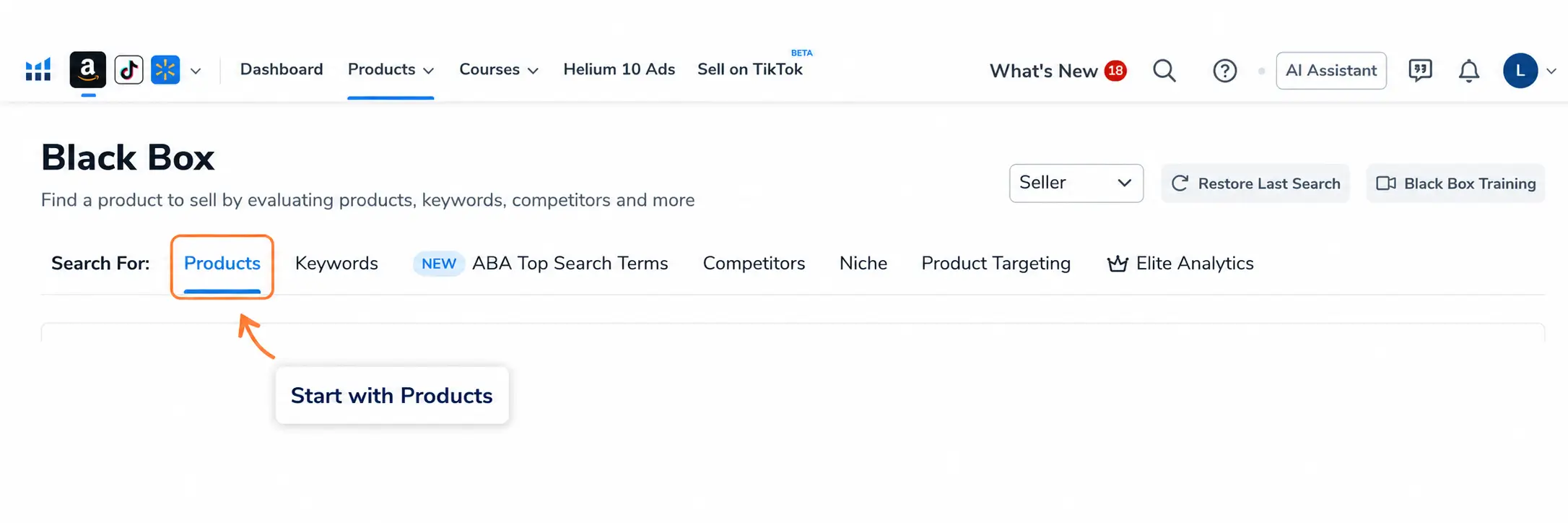
Black Box includes several tabs. You do not need to master all of them on day one. For most beginners, the Products tab is the best place to start.
| Black Box Tab | Best For | Beginner Note |
|---|---|---|
| Products | Finding product ideas using product filters. | Start here. |
| Keywords | Finding product ideas based on search demand. | Useful after you understand your niche. |
| ABA Top Search Terms | Reviewing top ASINs, click share, and conversion behavior. | More advanced. |
| Competitors | Researching sellers, brands, or competitor catalogs. | Useful after you find a niche. |
| Niche | Exploring a broader market segment. | Helpful for niche-level research. |
| Product Targeting | Finding related products and buying patterns. | Useful for expansion ideas. |
| Elite Analytics | Uploading lists for deeper metrics. | Advanced use case. |
If you are new to Amazon FBA, do not overcomplicate this. Start with Products. Once you understand how products, filters, and results work, you can explore Keywords, Competitors, Niche, and Product Targeting later.
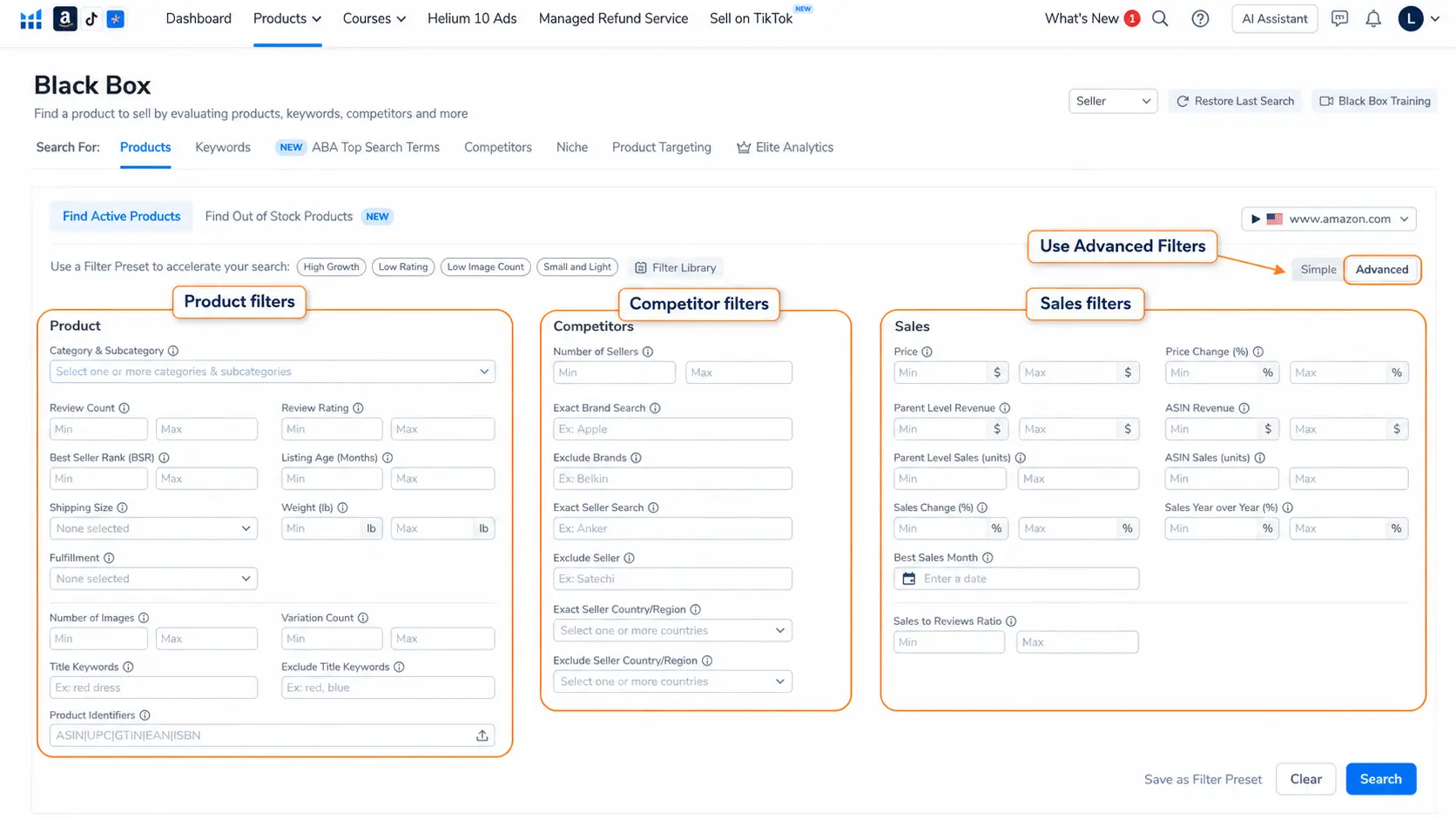
Simple vs Advanced Product Search
When you open the Products tab, Black Box can be used in Simple or Advanced mode.
Simple mode is useful when you want to start quickly. It usually focuses on basic inputs such as marketplace, category, product size, competition, price range, and monthly revenue.
Advanced mode gives you more control. It lets you use deeper filters across product details, competitor signals, and sales data. If you are serious about building a useful shortlist, Advanced mode is usually better.
That does not mean you should use every filter. Beginners often make their searches too narrow too soon. Start with a few meaningful filters, review the quality of the results, and then adjust.
How to Use Helium 10 Black Box for Amazon Product Research Step by Step
This Helium 10 Black Box tutorial shows a simple product research workflow: choose the right marketplace, start with the Products tab, apply beginner-friendly filters, review the results, save promising ideas, and then validate them outside Black Box before making a product decision.
1. Choose the Correct Marketplace
Start by choosing the marketplace you actually want to sell in. Do not assume that product demand in the United States will match demand in the United Kingdom, Canada, Germany, or another marketplace.
Shopping behavior, search terms, prices, competition, and product expectations can change by country. If you plan to research Amazon.com, make sure the marketplace is set to the United States. If you plan to sell elsewhere, run separate searches for that marketplace.
2. Start With the Products Tab
For beginner product research, the Products tab is usually the cleanest starting point. It lets you search the Amazon product database using product-level filters such as category, price, revenue, sales, reviews, size, and seller competition.
The Keywords tab can be useful later, especially when you want to find product ideas from search demand. But if you are still learning how Black Box works, start with Products.
3. Choose a Category or Subcategory
Choosing a category helps reduce noise. If you search across every category, you may get too many unrelated products and waste time reviewing ideas that do not fit your budget, skills, or sourcing plan.
A better approach is to start with a broad but relevant category, then narrow into a subcategory if the results are too general.
For example, instead of researching all of Home & Kitchen, you might narrow toward storage, organization, kitchen accessories, or another area that fits your product criteria.
4. Add Beginner-Friendly Filters
Do not start with every filter. Start with filters that answer the biggest questions first:
- Is there demand?
- Is the price range reasonable?
- Is the competition too strong?
- Is the product too large, heavy, or complex?
- Are there signs of weak listings you could improve?
A beginner-friendly starting point could include category, price, monthly sales, review count, number of sellers, size or weight, and fulfillment type.
5. Run the Search and Review the Results
After setting your filters, run the search and review the products that appear. Do not judge products only by revenue. Look for patterns.
If several similar products appear with steady demand and manageable competition, that can be a stronger signal than one random product with impressive numbers.
A single product can be an outlier. A cluster of related products may point to a niche worth researching.
6. Save Promising Ideas to a Shortlist
When a product looks interesting, save it instead of trying to decide immediately. Your goal at this stage is to build a shortlist, not place an inventory order.
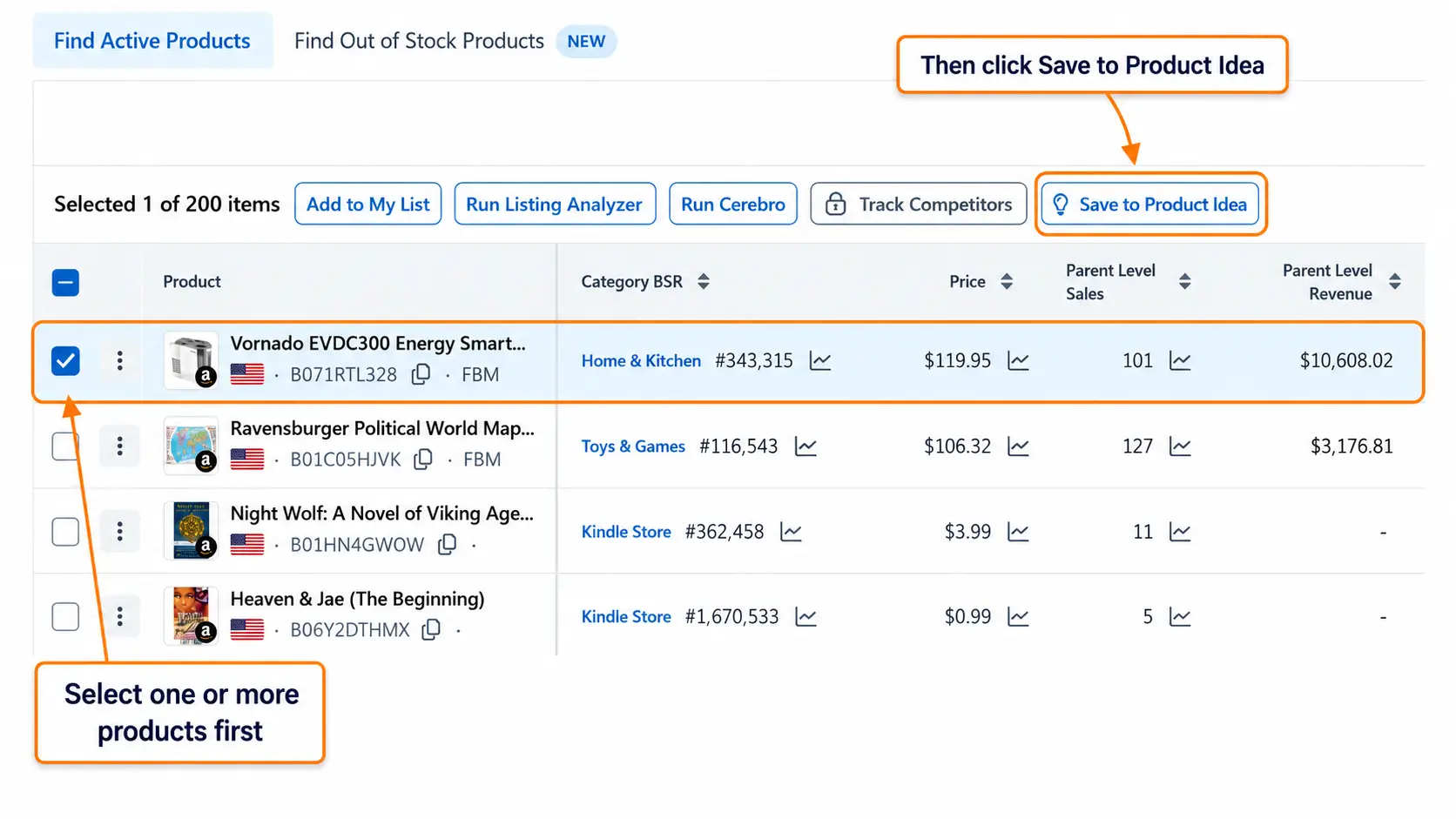
Saving products helps you return to them later and compare them more carefully. It also keeps your research organized as you move into deeper validation.
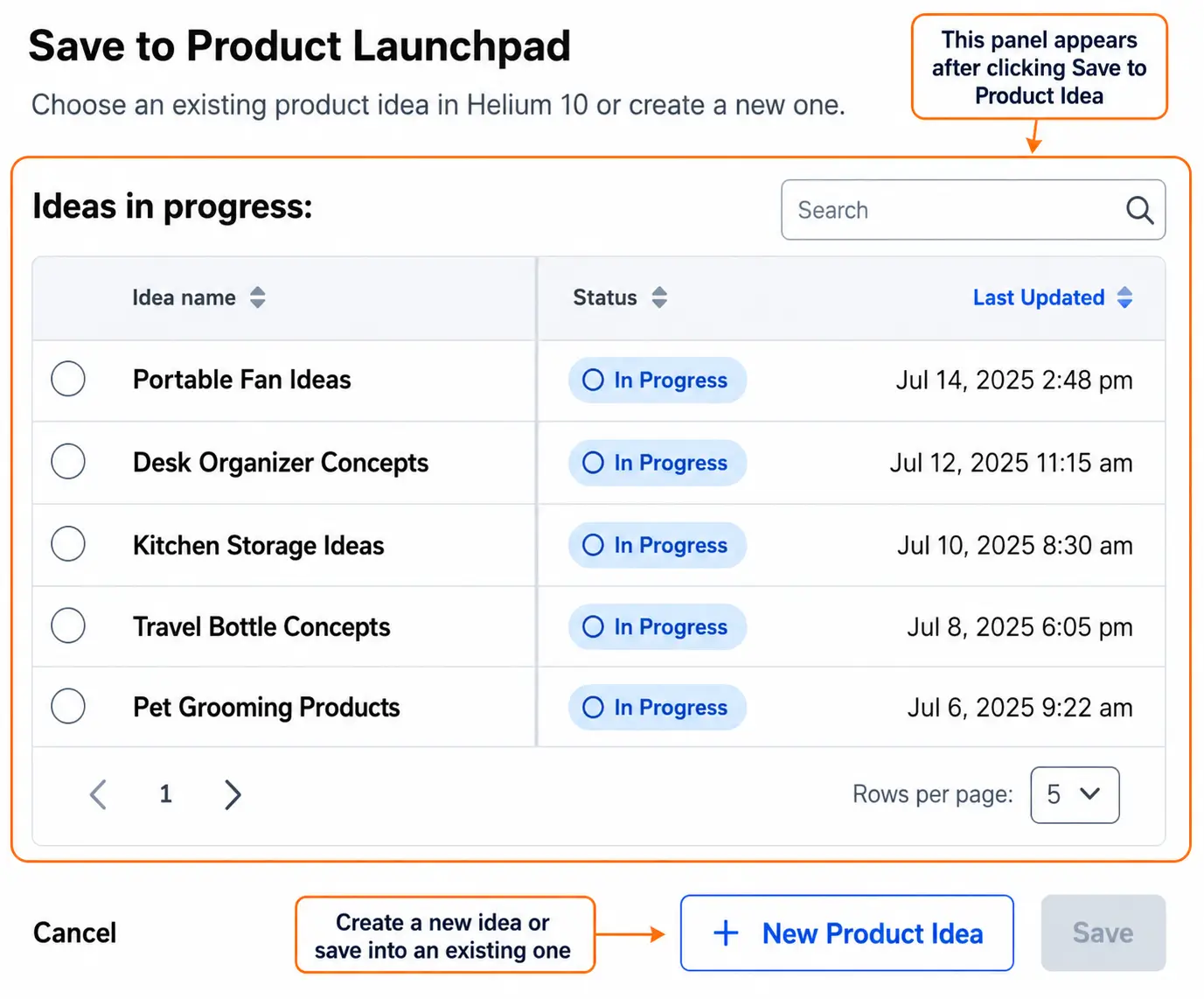
7. Validate Outside Black Box
Once a product looks interesting in Black Box, do not jump straight to suppliers. Open the product on Amazon, check the search results, review the competitors, and look for customer complaints.
This is where tools like Xray, Product Opportunity Explorer, and fee calculators become important. Black Box can point you toward an idea. The rest of your research decides whether that idea is worth pursuing.
Best Helium 10 Black Box Filters for Amazon Product Research
The best Helium 10 Black Box filters for Amazon product research depend on your category, budget, marketplace, and product strategy. Still, some filters are especially useful for beginners because they help remove obviously weak or risky ideas before you spend time validating them.
| Filter | Why It Matters | Beginner Note |
|---|---|---|
| Category / Subcategory | Keeps your research focused. | Avoid searching the entire marketplace. |
| Price | Affects margin, conversion, and budget. | Very low prices can make profit harder. |
| Monthly Sales | Shows estimated demand in units. | Use it as a demand signal, not proof. |
| Monthly Revenue | Shows estimated sales value. | Compare it with unit sales and price. |
| Review Count | Helps estimate competition strength. | High reviews can mean harder entry. |
| Review Rating | Shows customer satisfaction. | Low ratings may reveal improvement opportunities. |
| Number of Sellers | Shows how crowded the listing may be. | Too many sellers can be a warning sign. |
| Size / Weight | Affects shipping, storage, and FBA fees. | Small and light products are often easier for beginners. |
| Number of Images | Can reveal weak listings. | Good sales with poor images may deserve a closer look. |
| Variation Count | Shows listing complexity. | Many variations can complicate inventory. |
Use these filters to reduce noise, not to guarantee success. A product can match your filters and still be a bad idea after you check fees, suppliers, reviews, seasonality, or legal risk.
What Does Monthly Sales Mean in Helium 10 Black Box?
Monthly Sales in Helium 10 Black Box refers to estimated unit sales over a monthly period. It helps you understand whether a product appears to have demand.
This is one of the most important metrics in Black Box, but it is also one of the easiest to misread.
Monthly Sales does not tell you whether the product is profitable. It does not tell you whether you can source it at a good cost. It does not tell you whether the niche is safe, stable, or easy to compete in.
It tells you one thing: the product appears to be selling units.
Monthly Sales vs Monthly Revenue
| Metric | What It Means | How to Use It | Caution |
|---|---|---|---|
| Monthly Sales | Estimated number of units sold. | Use it to understand demand. | Does not show profit. |
| Monthly Revenue | Estimated sales value. | Use it to understand market size. | Can look high because of price, not volume. |
A product with high revenue but low unit sales may be expensive and harder to validate. A product with steady unit sales but moderate revenue may be more consistent. You need to look at both.
Is Estimated Monthly Sales Accurate?
Sales estimates are useful, but they are not guaranteed numbers. Helium 10 uses data sources and proprietary models to estimate product performance. That means the data can be directionally helpful without being exact.
Use Monthly Sales to compare opportunities and filter weak ideas. Do not use it as a final forecast for how many units you will sell.
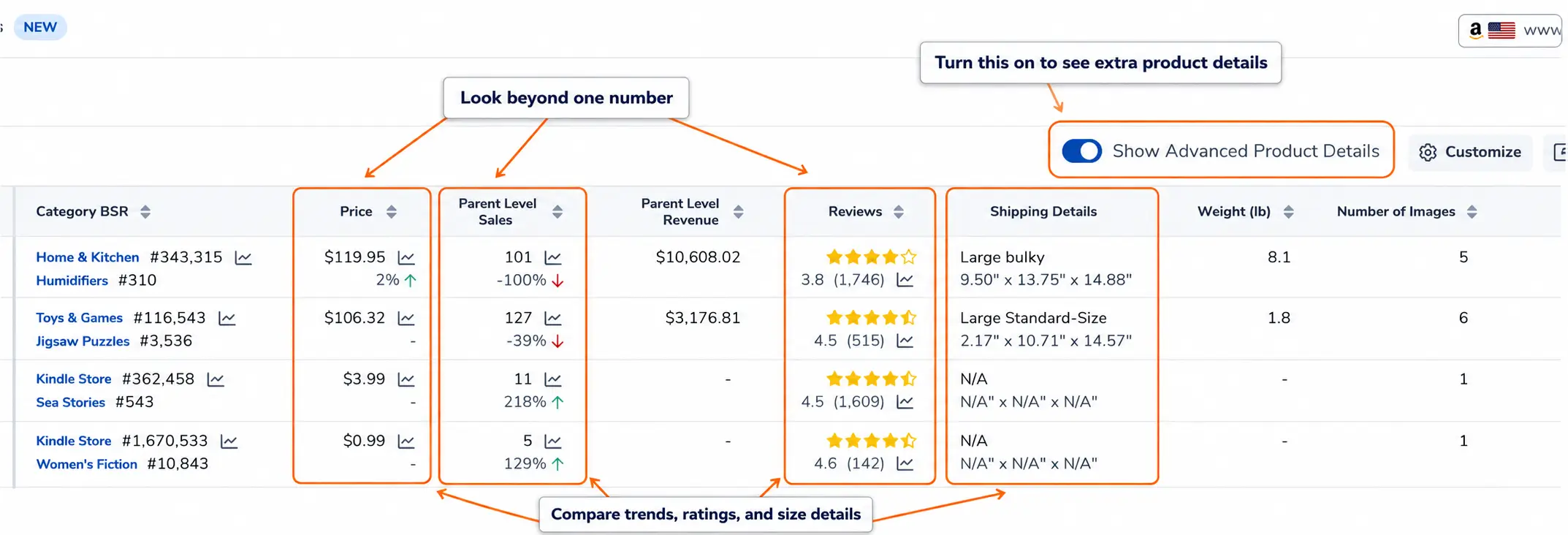
A simple rule: if Black Box says one product sells hundreds of units and another sells almost nothing, that difference matters. But before you act, you still need to validate the idea with Amazon search results, Xray, reviews, fees, and supplier research.
How to Read Black Box Results
Once Black Box shows results, the real work begins. Do not sort by the biggest revenue number and assume the top product is best.
Read the results like a checklist:
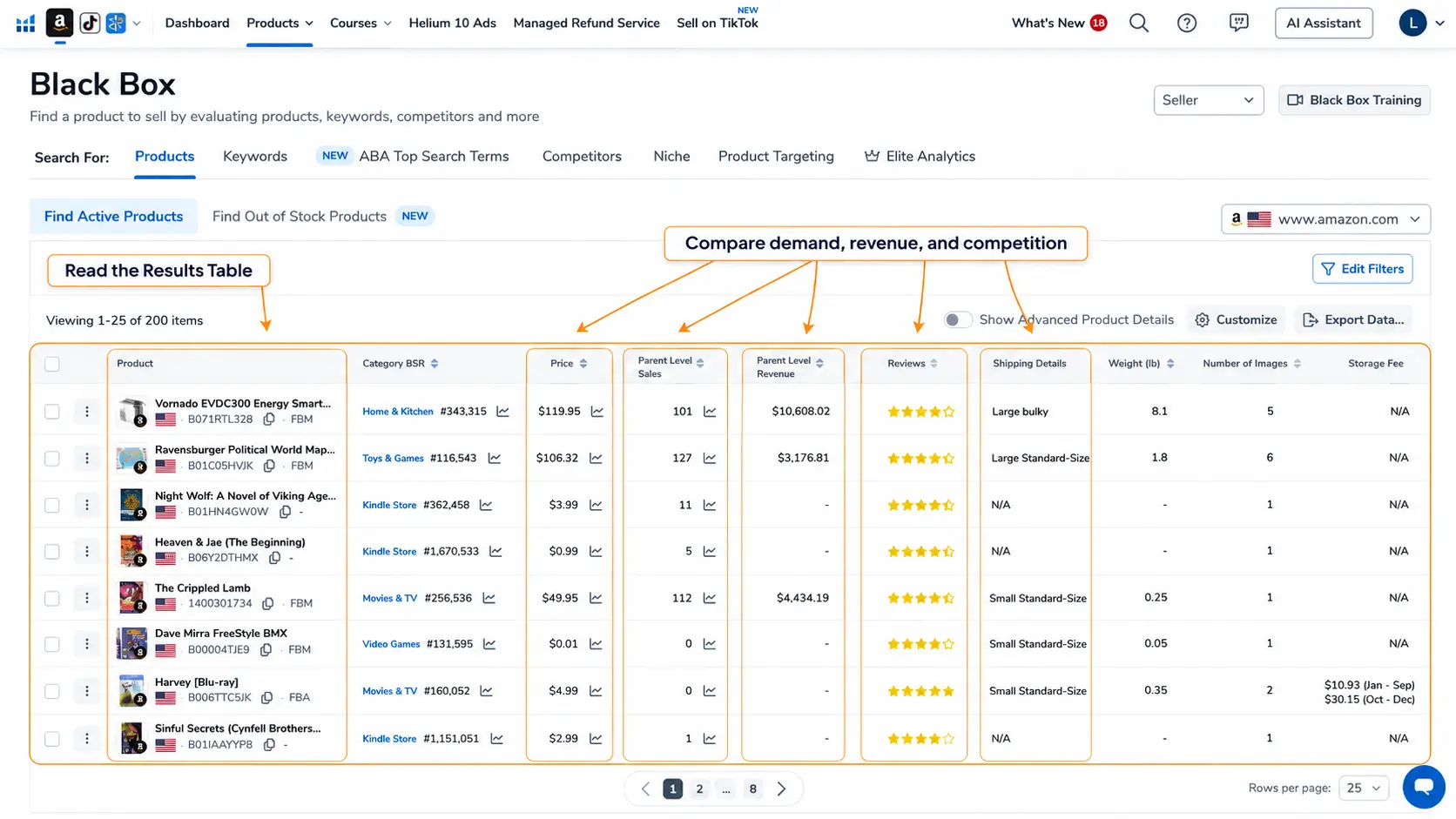
| Metric | What to Check |
|---|---|
| Price | Can the product support your margin after fees, ads, shipping, and product cost? |
| Monthly Sales | Is there enough unit demand to justify deeper research? |
| Monthly Revenue | Is the market large enough, or is the product too small to matter? |
| Reviews | Are competitors too established? |
| Rating | Are customers satisfied, or is there room for improvement? |
| Seller / Brand | Is the market controlled by strong brands or many resellers? |
| Fulfillment | Are sellers using FBA, FBM, or mixed fulfillment? |
| Size / Weight | Will shipping and FBA fees hurt the margin? |
| Variation Count | Is the product simple, or does it require many sizes or colors? |
| Images | Are current listings poorly optimized? |
One useful pattern is demand plus weakness. For example, a product with steady sales but weak images, poor copy, or repeated customer complaints may be more interesting than a product with high sales and perfectly optimized competitors.
But do not assume a weak listing means an easy opportunity. Strong brands can have weak listings too. Always open the Amazon page and review the actual competitors.
What to Do If Black Box Shows Too Many or Too Few Results
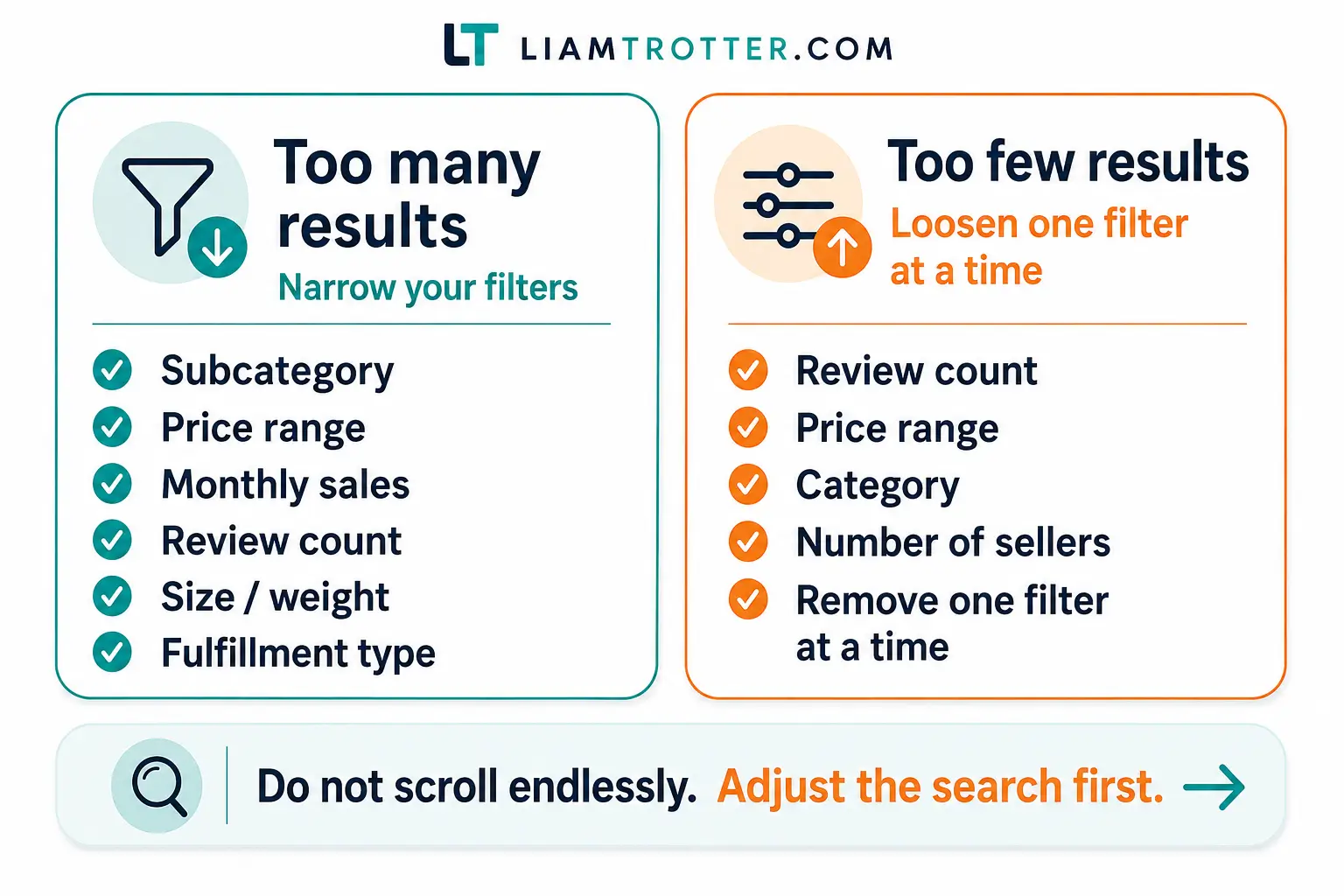
If Black Box returns too many results, your search is probably too broad. Do not scroll endlessly. Tighten the research.
Try narrowing by:
- Subcategory
- Price range
- Monthly sales
- Review count
- Number of sellers
- Size or weight
- Fulfillment type
- Exclude title keywords
If Black Box returns too few results, your filters may be too strict, or the niche may be too small. Loosen one filter at a time. Start with review count, price, or category before removing demand filters completely.
If you must loosen every filter just to find results, that may be a sign the niche is not strong enough for your goals.
Also remember that Black Box may limit the number of results displayed depending on your Helium 10 plan. For example, Platinum may show up to 200 results, while Diamond and Elite may show up to 500. Plan details can change, so check your current Helium 10 account or pricing page for the latest limits.
Common Mistakes Beginners Make With Black Box
Black Box is powerful, but it can mislead you if you read the numbers too quickly.
- Choosing products based on revenue only. Revenue does not show profit, fees, sourcing difficulty, or competition strength.
- Ignoring Monthly Sales. Revenue can look strong because of price, but unit demand may be weak.
- Using filters that are too broad. Broad searches create noise and waste time.
- Using filters that are too strict. Over-filtering can hide useful ideas.
- Ignoring size and weight. Bulky products can become expensive quickly.
- Assuming low reviews means easy competition. You still need to check brand strength, listing quality, and seller quality.
- Ignoring seasonality. A product can look strong during one season and weak for the rest of the year.
- Not reading reviews. Customer complaints often reveal whether the product can be improved.
- Not checking FBA fees. A product can sell well and still leave poor margins.
- Treating Black Box as the final answer. It should start your research, not finish it.
For me, the biggest beginner mistake is moving too quickly from “this product has numbers” to “this product is worth selling.” There are several steps in between.
What to Do After You Find a Product in Black Box
After you find a product idea, your next job is to decide whether it deserves deeper research.
| What You See | What It Might Mean | Next Step |
|---|---|---|
| Good sales, moderate reviews, weak listings | Possible opportunity. | Shortlist and validate. |
| Good revenue, low unit sales | Demand may be fragile. | Research more carefully. |
| High sales, very high reviews | Strong competition. | Research more or reject. |
| Heavy or bulky product | Fees and shipping risk. | Check FBA fees and landed cost. |
| Seasonal sales pattern | Cash flow and timing risk. | Check trends and seasonality. |
| Strong brands dominate page one | Harder competition. | Reject or research deeper. |
| Several similar products show demand | Possible niche cluster. | Shortlist and compare competitors. |
Before contacting suppliers or ordering samples, check:
- Amazon search results
- Xray or similar product data
- Customer reviews and complaints
- Product size and FBA fees
- Estimated launch budget using an Amazon FBA cost calculator
- Supplier availability and minimum order quantity
- Possible patents, certifications, or restricted category issues
If the numbers still make sense after those checks, the product can stay on your shortlist. If not, reject it and move on. Good product research is often about removing bad ideas quickly.
Can You Use Helium 10 Black Box for Free?
Helium 10 may provide limited Black Box access on a free account. In one free account view, Black Box showed 5 free uses, while paid plans displayed Black Box as included.
For serious research, free access is usually too limited. You may be able to test the tool, but if you want to run repeated searches, save ideas, compare filters, and use Black Box as part of a real research workflow, you will likely need a paid plan.
Plan limits and pricing can change, so always check Helium 10’s current pricing page or your account dashboard before choosing a plan.
Helium 10 Black Box Alternatives
Black Box is not the only product research tool. Depending on your workflow, you may also compare it with tools such as Jungle Scout, AMZScout, Viral Launch, or SmartScout.
You can also use Amazon’s own Product Opportunity Explorer as a complementary research source. It is not the same type of tool as Black Box, but it can help you understand niche demand, search terms, and customer behavior from Amazon’s perspective.
The best tool depends on what you need. Black Box is useful for idea discovery and filtering. It should be combined with deeper validation before you make a product decision.
FAQ: Helium 10 Black Box
What is Helium 10 Black Box?
Helium 10 Black Box is a product research tool that helps Amazon sellers find product ideas using filters such as category, price, sales, revenue, reviews, ratings, size, and competition signals.
How do you use Helium 10 Black Box for product research?
Start with the Products tab, choose the correct marketplace and category, add beginner-friendly filters, review the results, save promising ideas, and then validate those ideas outside Black Box using Amazon search results, Xray, reviews, fees, and supplier checks.
Which Black Box tab should beginners use first?
Most beginners should start with the Products tab because it is the most direct way to find product ideas using filters such as price, monthly sales, reviews, category, size, and competition.
What does Monthly Sales mean in Helium 10 Black Box?
Monthly Sales is an estimate of how many units a product sells in a monthly period. It helps you understand demand, but it does not prove that the product is profitable or easy to sell.
Is estimated monthly sales accurate?
Estimated monthly sales can be useful for comparing products and filtering ideas, but it should not be treated as an exact number. Use it as a direction signal, then validate the product with additional research.
Can you use Helium 10 Black Box for free?
Helium 10 may offer limited Black Box access on a free account. In one free account view, Black Box showed 5 free uses. Since plan limits can change, check Helium 10’s current pricing page or your account dashboard for the latest details.
Is Black Box enough to choose a product?
No. Black Box is useful for discovering product ideas and building a shortlist, but you still need to check competition, reviews, fees, profitability, suppliers, restrictions, and real Amazon search results before choosing a product.
What are the best Black Box filters for beginners?
Beginner-friendly filters include category, price, monthly sales, monthly revenue, review count, rating, number of sellers, product size, weight, fulfillment type, and number of images. Start simple, then refine your filters as you review the results.
What should you do after finding a product in Black Box?
Save the product to your shortlist, open the Amazon listing, analyze competitors, review customer complaints, check Xray or similar data, estimate FBA fees and margins, and decide whether to reject the idea or continue researching it.
Final Thoughts
Helium 10 Black Box is useful because it helps you stop guessing. Instead of starting with a random product idea, you can filter the market by demand, price, reviews, competition, size, and other signals.
But the goal is not to find a “guaranteed winning product” inside Black Box. The goal is to build a smarter shortlist.
Use Black Box to find ideas. Use Amazon search results, Xray, Product Opportunity Explorer, customer reviews, FBA fees, and launch budget checks to validate them. That is a safer way to approach Amazon FBA product research, especially if you are still learning how to judge product opportunities.
If you want the full research process beyond Black Box, start with this guide to Amazon FBA product research.
